

E-Commerce Strategies
Amazon PPC ROI measures how profitable your ad campaigns are by comparing the revenue they generate to all associated costs. Unlike ROAS, which only focuses on ad spend and revenue, ROI provides a more complete picture by including costs like product expenses, Amazon fees, and overhead. Here's the formula:
ROI = (Revenue - Total Costs) / Total Costs
For example, if you spend $4,000 (including all costs) to generate $5,000 in revenue, your ROI is 25%. This means you earn $0.25 for every dollar spent.
Key Takeaways:
ROI vs. ROAS: ROAS shows revenue per ad dollar; ROI factors in all costs for true profitability.
Break-even ROAS: Calculate as 1 ÷ Profit Margin to know the minimum return needed to avoid losses.
Improving ROI: Use Amazon's reporting tools to analyze data, adjust bids, and optimize campaigns.
Tracking ROI ensures your campaigns are profitable, not just generating sales. Understanding the balance between Amazon SEO vs. PPC is also vital for long-term growth. Dive deeper into metrics like TACoS and break-even ACoS for a clearer view of your ad performance.
Basic Formula for Calculating Amazon PPC ROI
The Standard ROI Formula
The formula for calculating Amazon PPC ROI is simple: ROI = (Revenue - Ad Spend) / Ad Spend. This calculation gives you the percentage return on every dollar spent on advertising. For instance, if you invest $100 in ads and generate $300 in revenue, the ROI would be ($300 - $100) / $100, resulting in a 200% return. In other words, for every $1 spent, you’re making $2 in profit.
This differs from ROAS (Return on Ad Spend), which is calculated by dividing revenue by ad spend. While ROAS focuses on how much revenue your ads generate, ROI digs deeper by factoring in costs, giving you a clearer picture of your profitability.
Breaking Down the Formula
It's important to understand the two key components of this formula so you can decide whether to scale up a successful campaign or cut losses on one that isn’t performing:
Revenue: This is the total sales directly attributed to your PPC campaign. You can track this data using Amazon’s reporting tools, though it may take 12–48 hours for the numbers to update.
Ad Spend: This represents the total cost of your advertising efforts, including all CPC (Cost Per Click) charges. Even small reductions in ad spend can make a noticeable difference in your ROI.
If your Ad Spend exceeds your Revenue, the result will be a negative ROI, signaling that your campaign is operating at a loss. Up next, we’ll walk through how to apply this formula to your campaign data step by step.
How to Increase Your ROI on Amazon - Learn Amazon PPC With Sunitha Sundaran
How to Calculate Amazon PPC ROI Step-by-Step
How to Calculate Amazon PPC ROI in 3 Steps
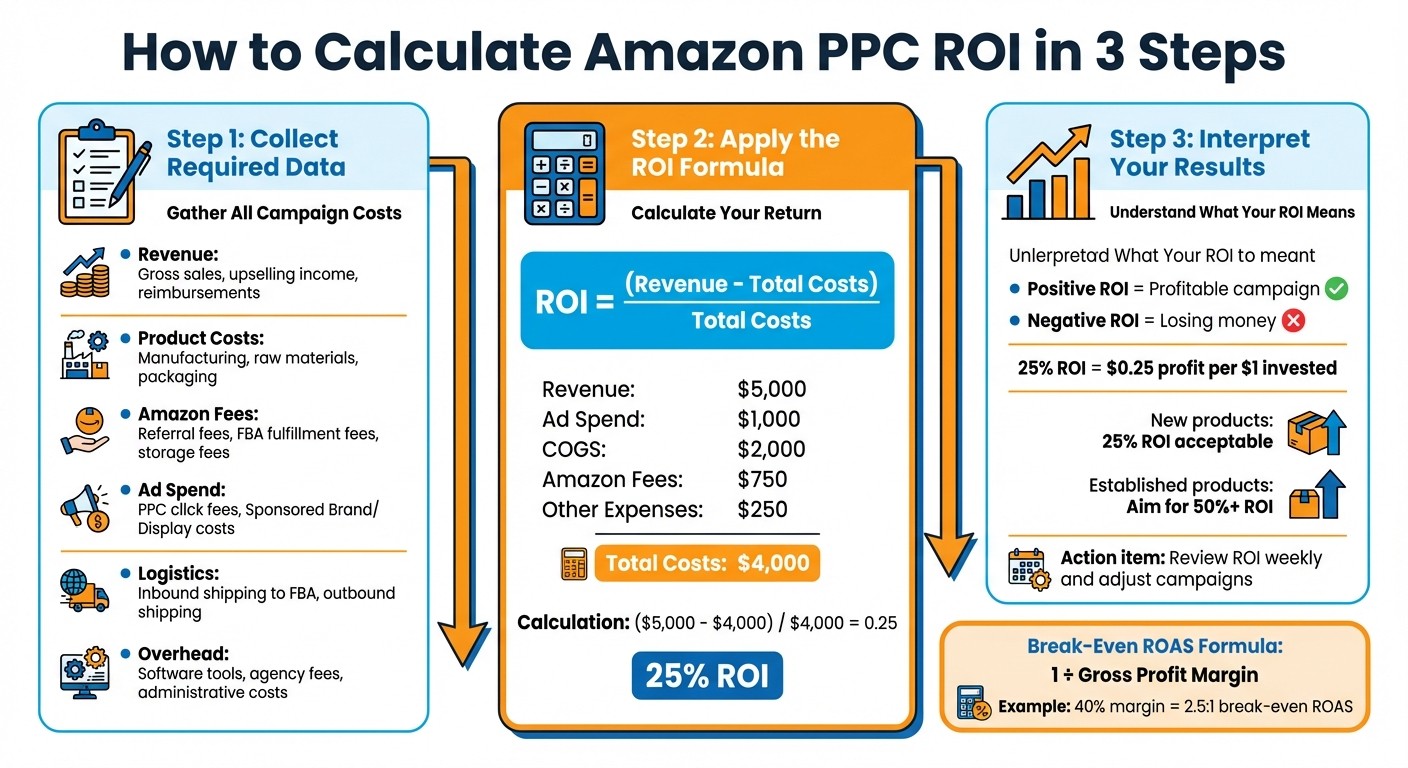
Collecting the Required Data
To calculate your Amazon PPC ROI accurately, you’ll need to gather specific data from various sources. Start by accessing your Advertising Reports in Amazon Seller Central to retrieve your total ad spend and attributed sales.
Next, compile your Cost of Goods Sold (COGS), which includes expenses like raw materials, manufacturing, packaging, and shipping to Amazon's fulfillment centers. Don’t forget to account for Amazon referral fees and FBA fulfillment fees. Lastly, factor in any operating expenses, such as software subscriptions (like Helium 10 or Jungle Scout), agency retainers, or salaries for team members involved in managing your PPC campaigns.
Data Category | What to Collect |
|---|---|
Revenue | Gross sales, upselling income, reimbursements |
Product Costs | Manufacturing, raw materials, packaging |
Amazon Fees | Referral fees, FBA fulfillment fees, storage fees |
Ad Spend | PPC click fees, Sponsored Brand/Display costs |
Logistics | Inbound shipping to FBA, outbound shipping |
Overhead | Software tools, agency fees, administrative costs |
Once you’ve gathered all these data points, you’re ready to calculate your ROI and assess the profitability of your campaigns.
Using the Formula with Real Campaign Data
The formula for ROI is straightforward: ROI = (Revenue - Total Costs) / Total Costs. Let’s break it down with an example:
Imagine a campaign generates $5,000 in revenue with the following costs:
Ad Spend: $1,000
COGS: $2,000
Amazon Fees: $750
Other Expenses: $250
Your total costs would be $4,000 ($1,000 + $2,000 + $750 + $250). Using the formula:
($5,000 - $4,000) / $4,000 = 0.25 (25% ROI)
This means for every dollar you invested, you earned $0.25 in profit. While ROAS (Return on Ad Spend) might highlight revenue success, ROI gives you the full picture by including all associated costs, making it a more accurate measure of profitability.
Reading and Understanding Your ROI Results
Here’s what your ROI numbers tell you:
A positive ROI indicates profitability.
A negative ROI means you’re losing money.
For instance, a 25% ROI might be acceptable for a new product launch, but for an established product, you’d aim for a higher ROI - say, 50% or more.
"ROI is a superior metric compared to ROAS - It takes into account all of the additional costs." - PPC.io
To determine your break-even ROAS, use this formula: 1 ÷ Gross Profit Margin. For example, if your profit margin is 40% (0.40), your break-even ROAS is 2.5:1. Any ROAS below this means you’re not covering your costs, even if revenue looks strong.
Make it a habit to review ROI weekly. Optimize your Amazon PPC campaigns by adjusting bids, adding negative keywords, or pausing underperforming ads to ensure your ad spend delivers real returns.
Other Important Metrics for Amazon PPC Performance
While ROI is a key measure of success, metrics like ROAS, TACoS, and break-even ACoS provide additional insights that can help fine-tune your Amazon PPC campaigns.
ROAS (Return on Ad Spend)
ROAS measures how much revenue you earn for every dollar spent on advertising. The formula is straightforward: Revenue ÷ Ad Spend. For example, if you spend $1,000 on ads and generate $4,000 in sales, your ROAS is 4:1 (or 400%).
This metric is particularly useful for making quick campaign tweaks, such as adjusting bids or testing keywords. However, don’t rely solely on ROAS - it doesn’t account for your product margins.
"ROAS alone is a preliminary metric. It should be considered in the context of your profit margin. A high ROAS may still mean you're losing money if your margin is too low." - Amazon Ads
The industry average for ROAS is around 2:1, but many successful brands aim for 4:1 to cover overhead and allow for reinvestment. To avoid losses, calculate your break-even ROAS - the minimum return needed to cover all costs. Falling below this threshold means you’re losing money, even if your revenue looks strong.
Next, let’s look at TACoS, which provides a broader view of how ads influence your overall revenue.
TACoS (Total Advertising Cost of Sales)
TACoS compares your ad spend to your total revenue. The formula is: (Total Ad Spend ÷ Total Revenue) × 100. Unlike ACoS, which focuses only on ad-attributed sales, TACoS reveals how advertising impacts your entire business.
A lower TACoS signals greater efficiency, showing that your ads are boosting organic rankings and brand visibility. For example, you might have an ACoS of 33%, but your TACoS could be just 10%. Studies show that sellers using balanced strategies can achieve a -12% TACoS while increasing sales velocity by 119%.
"TACoS differs from ACoS because it is more holistic and gives you a broader picture of revenue growth that stemmed from advertising." - Dawn Jenks, Copywriter, Feedvisor
Monitoring TACoS at the product level helps identify ASINs overly dependent on ads. For these products, focus on improving organic elements like SEO, images, and reviews to drive non-paid conversions.
Break-Even ACoS
Break-even ACoS is a critical metric for maintaining profitability. It’s calculated as your profit margin percentage. For example, if your profit margin is 30%, your break-even ACoS is also 30%. To remain profitable, your actual ACoS must stay below this level.
Once you’ve determined your break-even ACoS, aim for a target ACoS that’s lower to leave room for profit. If a campaign consistently exceeds break-even, it’s losing money and needs immediate adjustment.
"It's not about how high your ROAS is - it's about whether your ROAS is higher than your break-even ROAS." - Amazon Ads Strategy Guide
During product launches, it’s common to have an ACoS close to or even above break-even to gain visibility and improve organic rankings. However, for established products, staying well below break-even is crucial for long-term success.
Worked Example with Sample Numbers
Sample Campaign Scenario
Let’s break this down with a practical example. Imagine you’re selling a pair of running shoes on Amazon for $100.00 each. Producing each pair costs you $50.00 (COGS), and you spend $16.67 on Amazon PPC ads to generate one sale.
Here’s the math: your total cost per sale is $66.67 (COGS + ad spend). That’s the number you’ll use as the denominator in your ROI formula. Meanwhile, the $100.00 selling price represents your revenue.
Calculating ROI with the Sample Data
The ROI formula is: (Revenue - Total Costs) / Total Costs.
Here’s how it looks: ($100.00 - $66.67) / $66.67 ≈ 0.499, or about 50% ROI.
This shows that for every dollar invested, you’re earning about $0.50 in profit. Now, compare this to ROAS (Return on Ad Spend). Using the ROAS formula, you’d calculate $100.00 / $16.67 = 6:1. While 6:1 might seem impressive, it doesn’t account for COGS and other expenses, giving you an incomplete picture of profitability.
Lessons from the Example
This example highlights why ROI outshines ROAS when it comes to measuring true profitability. A 6:1 ROAS might look strong, but the 50% ROI tells the real story by factoring in all costs. Let’s tweak the numbers to see the impact: if your COGS rise to $70.00, your total cost jumps to $86.67, dropping ROI to just 15%, even though your ROAS remains 6:1.
"ROI is a superior metric compared to ROAS - It takes into account all of the additional costs." - PPC.io
To ensure profitability, calculate your break-even ROAS before scaling. In this scenario, with a gross profit margin of 50% (that’s $50 profit on $100 revenue before ad spend), your break-even ROAS is 1 / 0.50 = 2:1. Since your actual ROAS is 6:1, you’re well above break-even and making a profit. However, any campaign falling below that 2:1 threshold would lose money, no matter how impressive the revenue looks.
This example drives home the importance of analyzing all costs when evaluating campaign performance. ROI gives you the full story, ensuring you make informed decisions about scaling and profitability.
Monitoring ROI in Amazon Seller Central

Using Advertising Reports to Monitor ROI
Amazon Seller Central provides several tools to help you track and analyze ROI metrics effectively. To get started, log into Seller Central, head over to Reports > Advertising Reports, select the type of report you need, set the date range, and download the report.
Keep in mind that sales data updates take between 12–48 hours, so ROAS (Return on Ad Spend) and ACoS (Advertising Cost of Sales) figures for today or yesterday might not be fully accurate. Amazon generally offers a 65-day look-back window for search term data, which is typically sufficient for most ROI analyses.
Start with the Search Term Report, which highlights the exact search queries customers used to find your products. It includes key metrics like sales and ACoS, helping you pinpoint high-performing keywords to target and low-performing ones to eliminate. The Targeting Report dives deeper into performance data for specific keywords, ASINs, and categories across campaigns. The Advertised Product Report shows which ASINs are delivering the best returns, while the Placement Report breaks down ad performance by placement (e.g., Top of Search vs. Product Pages), enabling you to adjust bids based on location. Lastly, the Budget Report identifies campaigns running out of budget early in the day, helping you avoid missed sales opportunities.
Here’s a quick breakdown of these reports and their ROI benefits:
Report Type | Primary Use for ROI Monitoring | Key Metrics Included |
|---|---|---|
Search Term | Spot high-converting vs. wasteful keywords | Customer Search Term, Sales, ACoS, ROAS |
Targeting | Fine-tune keyword, ASIN, and category bids | Impressions, Clicks, CTR, CPC, ROAS |
Advertised Product | Identify most profitable ASINs | Advertised SKU/ASIN, 7-Day Sales, ROAS |
Placement | Adjust bids for Top of Search vs. other locations | Placement (Top/Rest of Search), Sales, ACoS |
Budget | Avoid missed sales due to budget exhaustion | Average Time in Budget, Estimated Missed Sales |
Use these insights to guide your campaign adjustments and improve ROI in the next step.
Adjusting Campaigns to Improve ROI
Once you’ve analyzed your reports, it’s time to put that data to work. Start by using the Search Term Report to identify high-performing keywords and target them with Exact Match campaigns. At the same time, identify keywords bringing clicks but no sales, and add them as Negative Keywords to cut down on wasted spend.
For bid adjustments, focus on keywords with high Click-Through Rates (CTR) but low impressions - boosting bids here can help you capture more traffic. On the flip side, reduce bids for keywords with low conversion rates to protect your budget. If the Placement Report shows that ads perform better in "Top of Search", use bid multipliers to prioritize that placement for higher visibility.
Don’t forget to evaluate your product listings before increasing bids. Ensure your listings are "retail-ready" with at least 15 reviews and a 3.5+ star rating - otherwise, you risk spending on traffic that won’t convert. Allow about two weeks to gather enough data before making significant changes, ensuring your decisions are based on reliable trends.
"We recommend checking the search term report to identify keywords and products that are resulting in higher sales and conversion rate. Then, increase the bid on those and add them as exact match type to optimize." - Amazon Advertising Help
Lastly, reallocate budget from underperforming campaigns to those delivering the best ROI. By combining precise targeting, bid adjustments, and optimized placements, you can significantly enhance your campaigns' performance.
How eStore Factory Helps Improve Amazon PPC ROI
Professional PPC Campaign Management
Running Amazon PPC campaigns isn’t just about setting them up - it’s about keeping a constant eye on performance, fine-tuning strategies, and making adjustments based on real data. For sellers juggling multiple responsibilities, this can quickly become overwhelming. That’s where eStore Factory steps in, taking the weight off your shoulders with a data-driven approach to PPC management. They focus on identifying high-performing keywords while cutting out unnecessary ad spend.
Their strategy revolves around adjusting bids based on key metrics and addressing underperforming campaigns. Before increasing ad spend, they work on improving product listings to boost conversion rates and refining targeting, ensuring your budget isn’t wasted on campaigns that aren’t ready to deliver results.
What sets eStore Factory apart is their customized approach. Instead of relying on generic strategies, they craft campaigns tailored to your products and profit margins. They don’t just stop at ROAS; they dig deeper into metrics like ACoS, TACoS, and overall ROI to ensure your ad dollars are driving actual profitability, not just revenue. By factoring in costs like COGS, fulfillment, and agency fees, they help you understand your true return on investment. This careful, tailored approach ensures every dollar you spend is working as hard as possible to grow your business.
Full Amazon Account Support
Success on Amazon isn’t just about PPC - it’s about the entire ecosystem of your account. Optimized listings, competitive pricing, and a healthy account are all essential for long-term profitability. eStore Factory offers full Amazon account support to address these critical areas and make sure everything works together seamlessly.
Their services go beyond ads, covering everything from search-optimized product listings and A+ content to FBA reimbursement recovery and account management. They also tackle issues like suppressed listings or policy violations that could disrupt your campaigns. By enhancing every aspect of your Amazon presence - whether it’s product photography or your brand store design - they create a strong foundation for your PPC campaigns. When your listings convert better, every advertising dollar you spend delivers more value, boosting your overall ROI.
Conclusion
Calculating Amazon PPC ROI goes beyond crunching numbers - it's about ensuring every advertising dollar contributes to profitability. While metrics like ROAS and ACoS provide snapshots of campaign performance, ROI paints the full picture by factoring in all costs, from manufacturing to Amazon fees and shipping. This distinction matters because even campaigns with impressive ROAS can hurt profits if margins are tight. Understanding this creates a foundation for making smarter, data-driven adjustments.
"It's not about how high your ROAS is - it's about whether your ROAS is higher than your break-even ROAS." - Amazon Ads
While calculating ROI may be straightforward, its real power lies in shaping better decisions. Knowing your break-even ROAS - calculated as 1 divided by your gross profit margin - helps you scale campaigns effectively. For instance, while a 2:1 ROAS might appear acceptable, aiming for a 3:1 or 4:1 ratio ensures your costs are covered and profits grow. A great example is MidWest Homes for Pets, which used detailed performance data to focus on their pet bed category, leading to a 32% increase in ROAS by channeling resources into their most profitable segment[1].
Achieving long-term success requires consistent monitoring and fine-tuning. Regularly reviewing performance data and adjusting bids ensures you're covering costs while driving growth.
By keeping ROI as your guiding metric - from keyword selection to budget allocation - you can make smarter, more profitable decisions. And for those looking to take optimization further, eStore Factory offers expert Amazon consulting to help you maximize your returns.
[1] Amazon Ads Case Studies, 2021
FAQs
What’s the difference between ROI and ROAS in Amazon PPC campaigns?
ROI (Return on Investment) represents the percentage of profit you earn after covering all costs, such as ad spend, Amazon fees, and other related expenses. It gives you a comprehensive view of your overall profitability.
ROAS (Return on Ad Spend), on the other hand, focuses specifically on the revenue generated for each dollar spent on advertising. It’s expressed as a ratio and doesn’t take into account extra costs like fees or product expenses.
To put it simply, ROI measures your profitability, while ROAS evaluates how efficiently your ad spend generates revenue. Both metrics play a key role in assessing the success of your Amazon PPC campaigns, but they cater to different aspects of your business strategy.
What information is needed to calculate ROI for Amazon PPC campaigns?
To figure out your Amazon PPC ROI, you'll need two crucial pieces of information: the total revenue generated from your PPC ads (gross PPC sales) and all related costs. These costs can include ad spend, product costs, Amazon referral fees, FBA fees, shipping, storage, and any other overhead expenses tied to your campaigns.
Once you've gathered this data, plug it into this formula: ROI = (Gross PPC Sales – Total Costs) ÷ Total Costs × 100. This calculation will give you a percentage that clearly shows how much return you're getting from your PPC efforts.
How can I calculate and improve ROI for my Amazon PPC campaigns?
To boost ROI for your Amazon PPC campaigns, start by digging into key metrics available in Amazon's Campaign Manager reports. Look at data like Search Terms, Placement, and Performance to understand how your ads are doing in terms of sales, spend, ACOS (Advertising Cost of Sales), CTR (Click-Through Rate), and conversion rates.
Pinpoint high-cost, low-return keywords by sorting your data based on ACOS and performance benchmarks. For keywords that aren’t delivering results, consider adding them as negatives to cut down on wasted spend. On the flip side, adjust bids for profitable keywords - raise bids for terms with low ACOS to capture more traffic, and lower bids for keywords that are close to your target ACOS threshold. Don't forget about ad placements - allocate more of your budget to top-performing spots like Top of Search, and scale back on less effective placements.
Make it a habit to review and tweak your campaigns every week. Tracking performance trends regularly allows you to make smarter adjustments and stay on top of changes. If managing this process feels overwhelming, professional services can help you streamline your efforts and focus on growing your business.






