


E-Commerce Strategies
Want to succeed as an Amazon seller in 2025? Knowing the latest search trends is your edge. Here’s what you need to know:
Why Trends Matter: Spot rising keywords (e.g., "wireless earbuds" over "Bluetooth headphones") to optimize listings, improve visibility, and boost profits.
Top Tools: Use Amazon Brand Analytics, Product Opportunity Explorer, and platforms like Helium 10 or Jungle Scout for detailed keyword and competitor insights.
Key Metrics: Focus on search volume, click share, conversion rates, and sales velocity to identify winning products and adjust strategies.
Actionable Steps: Update listings with trending keywords, refine PPC campaigns, and plan for seasonal spikes like Prime Day and Black Friday.
This guide breaks down tools, metrics, and strategies to help you make smarter decisions, improve conversions, and stay ahead of competitors. Ready to dive in? Let’s go.
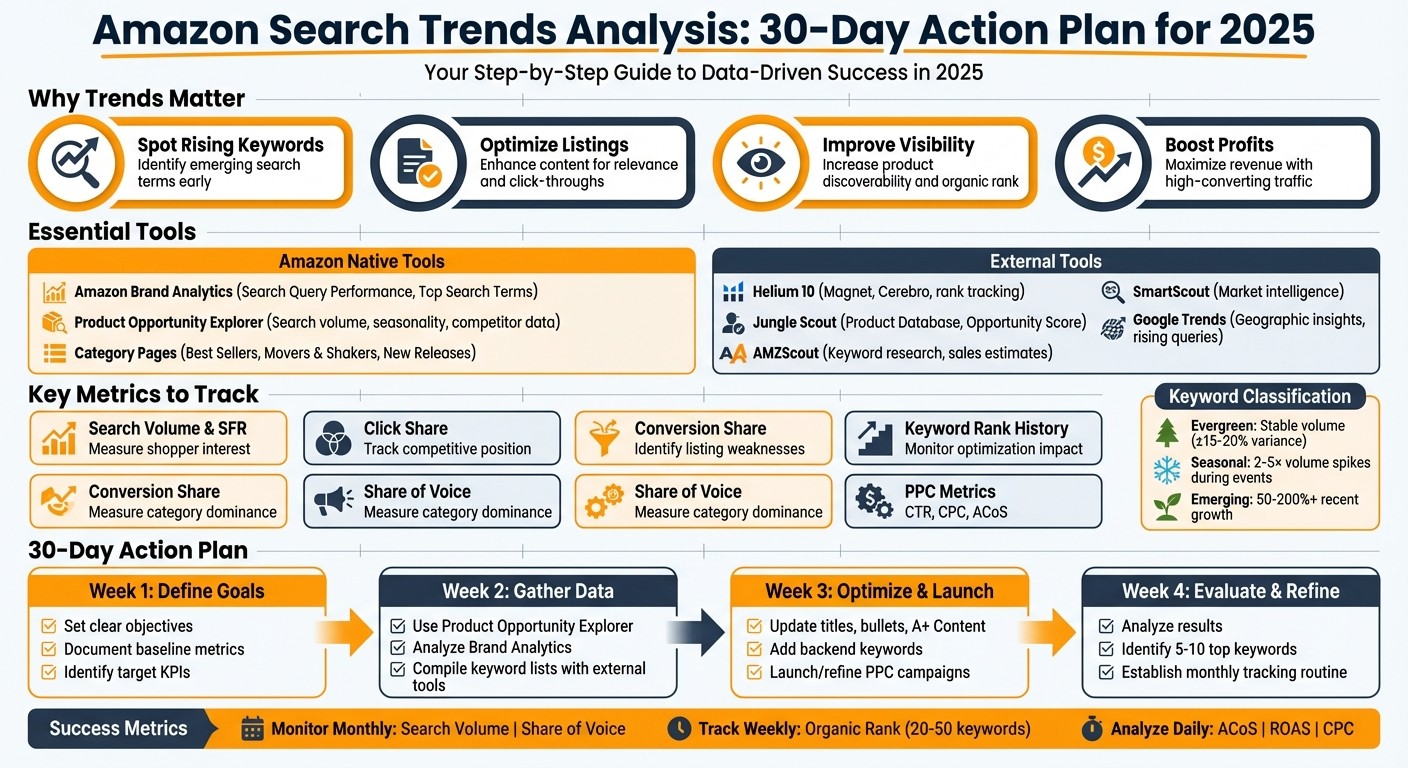
Amazon Search Trends Analysis: 30-Day Action Plan for Sellers
Amazon Search Query Performance Report: New Advanced Dashboard Unlocked - Here’s What’s Inside
Tools for Analyzing Amazon Search Trends
Having the right tools can mean the difference between guessing what customers want and knowing exactly where demand is headed. While Amazon offers some powerful built-in analytics tools, many successful sellers pair these with external platforms for a more complete understanding of search trends and market opportunities. Let’s dive into Amazon’s native tools first, then explore some external options.
Amazon's Built-In Analytics Tools
If you're brand-registered, Amazon Brand Analytics is an essential starting point. The Search Query Performance report provides insights into which search terms generate impressions, clicks, cart adds, and purchases for your ASINs. You can filter data from the past 30 to 90 days to identify high-visibility and high-converting queries. Meanwhile, the Top Search Terms report highlights the most popular queries in your category, along with metrics like click share and conversion share for each ASIN. If a term has high impressions but low click share, it might signal issues with your listing or SEO. On the other hand, high click share but low conversions could indicate challenges with pricing, reviews, or offers.
The Product Opportunity Explorer takes a broader approach by grouping products into niches and offering insights like search volume trends, seasonality, units sold, price ranges, and competitor counts. You can enter seed keywords to uncover niches with growing search volume, strong sales, and minimal competition. Seasonality charts help you distinguish between temporary spikes and sustained demand, while price range analysis ensures the niche aligns with your profit goals - such as maintaining an average selling price above $20.00. Additionally, category pages like Best Sellers, Movers & Shakers, and New Releases provide a snapshot of trending products. By studying these, you can reverse-engineer the search terms and niches driving their success.
External Keyword Research Tools
Third-party platforms often go beyond Amazon’s built-in tools, offering expanded keyword lists, historical data, and deeper competitive insights. Here’s a quick look at some popular options:
Helium 10: Includes tools like Magnet for generating keyword ideas with search volume estimates, Cerebro for reverse-ASIN keyword mining (to see which terms drive traffic to competitors), and rank tracking to monitor keyword performance over time.
Jungle Scout: Offers a Product Database with features like an Opportunity Score, search volume estimates, and tools for tracking market share and pricing trends.
AMZScout: Known for its simplicity and affordability, it provides keyword research, product filters for identifying new and trending items, and sales estimates to help you pinpoint high-demand products and the keywords behind them.
SmartScout: Focuses on market and brand-level intelligence, revealing which brands dominate specific categories, their product range, and estimated sales - ideal for identifying keyword and category gaps.
Most of these tools offer free trials or money-back guarantees, so you can test a couple to find the one that best suits your workflow and budget. Combining external tools with Amazon Brand Analytics allows you to validate data, uncover long-tail keyword variations, and measure demand and competition before committing to inventory.
Additional Data Sources
For broader search trend insights, Google Trends is a valuable resource. It shows relative search interest over time, geographic hotspots in the U.S., and rising related queries. If a term shows steady growth on Google Trends - especially in highly populated states like California, New York, or Texas - and gains traction on platforms like TikTok, Instagram, or YouTube, it’s a strong indicator of lasting demand rather than a fleeting trend. After validating a trend externally, you can track it on Amazon using tools like Brand Analytics and the Product Opportunity Explorer, along with third-party platforms, to fine-tune your inventory planning and listings.
For sellers managing multiple brands or complex product catalogs, agencies like eStore Factory can help integrate these data sources into a cohesive strategy. They specialize in Amazon SEO, PPC management, and listing optimization, helping you stay ahead in a competitive marketplace.
How to Analyze Amazon Search Trends: Step-by-Step Process
Set Your Analysis Goals
Before diving into data, it’s crucial to clarify your objectives. Are you launching a new product or improving an existing listing? Each goal requires a different approach. For new products, aim for a top-20 organic ranking for key terms within 60–90 days or target selling 100–300 units monthly at a 20–30% profit margin. If you're refining an existing listing, focus on improving your conversion rate by 20–30% by aligning titles and bullet points with high-intent keywords. Alternatively, aim to lower your ad ACoS by 10–20% by reallocating spend to better-performing search terms.
To stay organized, document your goals in a spreadsheet. Include columns for goal type, metric, baseline, target, timeframe, and who’s responsible. This keeps every analysis session focused on your business priorities.
Gather and Review Trend Data
If your brand is registered on Amazon, Brand Analytics is your best starting point. Use the Search Terms report to uncover top customer queries in your category over the last 7, 30, or 90 days. Pay attention to metrics like Search Frequency Rank, click share, and conversion share for the top three clicked ASINs - these reveal which competitors dominate and where ranking opportunities exist. Additionally, the Item Comparison & Alternate Purchase Behavior report highlights related products and substitute search paths, while Market Basket Analysis shows frequently bought-together items, which can inspire bundling ideas.
For deeper insights, turn to the Product Opportunity Explorer. Search by seed keyword or ASIN to identify product niches - clusters of related keywords and products. Analyze search term volume and growth rates over three, six, and twelve months to spot trends like rising demand, stability, or decline. Check metrics like the number of top-clicked products, average price, and average reviews to assess competition and market saturation. Export this data to filter by volume, growth, and competition for easier prioritization. If you’re not brand-registered, you can still gather trend signals by frequently checking Amazon’s Best Sellers, New Releases, and Movers & Shakers lists for rapid ranking changes.
Once you’ve collected data, classify keywords into three categories:
Evergreen: Keywords with stable volume (±15–20% variance).
Seasonal: Keywords tied to specific events like Halloween or Prime Day, showing 2–5× volume increases during those periods.
Emerging: Keywords with rapid recent growth, showing a 50–200%+ increase in volume.
Tag these keywords in your exported data to make filtering and prioritization easier.
Apply Insights to Your Amazon Strategy
Now that you’ve prioritized your data, it’s time to put it to work by refining your listings and advertising strategies.
For listing optimization, incorporate one or two primary trend keywords at the start of your title. For example: "Insulated Stainless Steel Coffee Tumbler 20 oz – Spill-Proof Travel Mug with Lid, Keeps Drinks Hot & Cold." Use bullet points to include one or two secondary trend keywords, pairing them with clear benefits like “fits most car cup holders” or “BPA-free.” In A+ Content, craft a narrative around use cases discovered in your search terms - such as camping, office, or gym - and include lifestyle images that reflect trending scenarios like work-from-home setups or outdoor adventures.
Don’t forget your backend keywords. Populate this section with keyword variations, synonyms, and long-tail terms that don’t fit naturally into customer-facing copy.
For PPC campaigns, create separate strategies for each keyword type:
Evergreen keywords: Use stable bids for consistent performance.
Seasonal keywords: Allocate higher bids during peak weeks, but keep these time-limited.
Emerging keywords: Set up test budgets to quickly validate new demand.
Increase bids and budgets for rising keywords where your organic rank is still low, and reduce or pause spend on keywords that are declining or irrelevant. Use the Search Query Performance tool to track your click share and conversion share, and monitor organic rank movement with external tools to directly link your optimizations to measurable outcomes.
Key Metrics and Strategies for Using Trend Data
Building on earlier data gathering and analysis tools, these metrics and strategies help sellers turn trend insights into actionable opportunities.
Important Search Trend Metrics to Track
Two key metrics form the backbone of trend analysis: search volume and Search Frequency Rank (SFR). Search volume reflects shopper interest, while SFR ranks the popularity of search terms (with lower numbers indicating higher popularity). By monitoring these metrics over time, you can differentiate between fleeting spikes and sustained trends.
Click share and conversion share provide insight into your competitive position. Through Brand Analytics, you can see how the top three products for a given search term perform in terms of clicks and conversions. For instance, if your click share is high but your conversion share lags, it might signal that your main image or title is attracting attention, but your product detail page needs improvement. Additionally, tools like Jungle Scout or Helium 10 offer keyword rank history, which lets you connect changes in your listing, pricing, or ad spend to shifts in ranking - helping you pinpoint what’s driving results.
Another critical metric, share of voice, measures how much revenue your products capture within a category or for specific keywords compared to competitors. When paired with PPC data - like impressions, click-through rate (CTR), cost-per-click (CPC), and ACoS - you can identify where to focus your resources. Amazon’s Search Query Performance dashboard also helps by showing where shoppers drop off in the funnel, from impressions to purchases.
These metrics provide the foundation for making smarter optimizations.
Advanced Optimization Strategies
Using data from Brand Analytics and third-party tools, you can organize keywords into three tiers: core, growth, and exploratory. Core keywords, which consistently convert at a manageable ACoS, should receive steady budgets and higher bids. Growth keywords - those with rising search volume and improving conversion rates - deserve incremental budget increases to capture more impressions. Meanwhile, exploratory keywords, often new or long-tail terms, should be handled with lower bids until their performance merits scaling.
For listings, keyword clustering ensures that your most important terms are strategically placed. High-volume, high-intent keywords should appear in titles, while secondary terms can populate bullet points and descriptions. Long-tail keywords, especially those tied to emerging trends, should be added to backend fields. As new synonyms or qualifiers gain traction, update titles and bullet points to reflect these shifts. For example, incorporating terms like "travel size" or "for small apartments" can help you tap into niche audiences when those phrases show growing search volume.
Aligning A+ Content and images with trending keywords can further enhance click-through and conversion rates. For instance, if trend data highlights seasonal phrases like "gift for dad" or "Black Friday deals", updating your content accordingly can drive engagement without sacrificing your listing’s long-term relevance.
Many agencies, such as eStore Factory, recommend maintaining a quarterly optimization calendar. This ensures that your listings and ad strategies adapt to shifting trends in real time, rather than reacting only after performance dips. By combining Amazon’s first-party data with third-party tools, you can better size opportunities and benchmark against competitors.
Planning for Seasonal and Event-Based Trends
Seasonal events like Prime Day, Black Friday, Cyber Monday, and Q4 holidays create predictable demand surges. Historical data shows that sales during these events can spike 2–4 times above normal levels. To prepare, schedule additional inventory to arrive 6–10 weeks in advance, accounting for FBA lead times across U.S. fulfillment centers.
Trend data can also highlight which subcategories experience the fastest growth during specific seasons. For example, toys and electronics typically surge in Q4, while patio and garden products peak in spring. During these times, increasing ad budgets and raising bids on seasonal keywords can boost visibility. Once demand normalizes, scaling back ensures efficient spending. Temporary updates to bullets and A+ Content - featuring timely phrases like "holiday gift ideas" - can capture seasonal interest without undermining your listing’s evergreen appeal.
Inventory management is another critical piece. Metrics like days of supply and sell-through rate, combined with trend forecasts, help you align shipments with expected demand. This minimizes the risk of stockouts, which can hurt your organic rankings, and prevents overstocking, which ties up capital. Sellers who integrate Amazon’s Product Opportunity Explorer with external trend tools can better anticipate shifts in category momentum, enabling them to adjust inventory and pricing strategies ahead of the curve.
Conclusion: Next Steps for Amazon Search Trends Analysis
Analyzing Amazon search trends isn’t just a task - it’s a key factor that separates thriving brands from those stuck in neutral as we move into 2025. Sellers who consistently track search volume, monitor keyword rankings, and adjust their listings and ad strategies to match evolving customer behavior tend to outshine competitors who rely on guesswork. The bottom line? Data-driven strategies are essential for excelling in areas like SEO, PPC, pricing, and inventory planning.
Here’s a streamlined 30-day action plan to help you put these insights into motion:
Week 1: Define clear goals using your current performance metrics as a baseline.
Week 2: Use tools like Amazon’s Product Opportunity Explorer, Brand Analytics, and an external tool to compile a list of keywords and trends for each product.
Week 3: Refresh your listings - update titles, bullet points, A+ Content, and backend keywords. At the same time, launch or refine Sponsored Products campaigns targeting high-potential search terms.
Week 4: Evaluate your results, pinpoint 5–10 top-performing keywords, and establish a monthly routine for tracking and optimization.
Keep a close eye on your KPIs. Monitor search volume and share of voice monthly, track organic rank for 20–50 priority keywords weekly, and analyze ad performance metrics like ACoS, ROAS, and cost-per-click. Shift your budget toward trending keywords that bring strong conversions at reasonable costs. Build a trend calendar that aligns with major U.S. retail events and review category trends 60–90 days ahead of time. This will help you fine-tune inventory, keywords, and ad spend. Avoid common pitfalls like chasing fleeting trends without verifying long-term demand, over-optimizing listings at the expense of readability, or making changes without giving them 14–28 days to show measurable impact.
For brands generating $25,000–$500,000 per month on Amazon, working with a specialized agency can speed up results. eStore Factory offers end-to-end Amazon solutions to help you act on trend insights. Their Amazon SEO services focus on optimizing product titles, descriptions, and A+ Content around emerging search terms tailored to U.S. shoppers. Their PPC management dynamically adjusts bids, scales spending on high-performing keywords, and keeps ACoS in check. Additionally, they provide account management, listing optimization, branding, design, and product photography, ensuring you can seize opportunities without overextending your resources.
Consider requesting a tailored Amazon account audit to evaluate your keyword strategy, trend alignment, and PPC setup. From there, you’ll get a 90-day growth plan with actionable steps like priority keyword recommendations, listing updates, ad campaigns, and testing milestones. Partnering with eStore Factory can help you transform search trends analysis into a core part of your Amazon strategy, backed by measurable KPIs like organic rank, conversion rate, and ROAS. Instead of treating it as an afterthought, make it the habit that drives your success.
FAQs
What are the best tools to analyze Amazon search trends in 2025?
In 2025, sellers have access to powerful tools that make analyzing Amazon search trends more efficient than ever. Advanced platforms like Helium 10, Jungle Scout, and Viral Launch stand out for their ability to blend Amazon's internal data with broader market insights. These tools are widely praised for helping sellers identify key search trends and refine their strategies to stay competitive.
For those seeking expert advice, services like eStore Factory offer specialized Amazon SEO consultancy and marketing solutions. Their tailored strategies are designed to improve search performance and support business growth.
How can I use new keyword trends to improve my Amazon listings?
To give your Amazon listings an edge with the latest keyword trends, start by diving into consistent keyword research. Look for high-traffic, low-competition keywords that align with your product. Tools designed for keyword tracking can help you spot new search terms. Once identified, weave these keywords naturally into your product titles, bullet points, descriptions, and backend search terms.
Keep an eye on changing consumer habits and adjust your listings accordingly. By staying in tune with current trends, you can increase your product’s visibility and maintain a competitive position in Amazon’s dynamic marketplace.
How can I effectively manage seasonal demand spikes on Amazon?
To manage seasonal demand surges on Amazon effectively, start with smart inventory planning. Make sure your stock levels are ready well in advance of peak seasons to prevent shortages. Use search trend data to anticipate demand shifts and fine-tune your ad campaigns to focus on high-traffic keywords during these critical times.
Take advantage of Amazon's FBA services to ensure quick and reliable delivery, which is especially crucial when demand is high. Introducing early promotions or limited-time deals can also help increase your product visibility and drive more sales. If you're looking to fine-tune your approach, working with specialists can provide valuable insights to optimize your strategy and boost your performance.






