


E-Commerce Strategies
Q4 is critical for Amazon sellers, often accounting for 35–60% of annual sales. Planning inventory for October through December can make or break your success. The challenge? Balancing stock levels to avoid running out or overstocking during peak shopping periods like Black Friday and Cyber Monday. Here's how to get it right:
Analyze past Q4 sales data: Use Amazon Seller Central to review unit sales, returns, and stockouts. Adjust for growth trends and exclude one-off promotions.
Account for market events: Factor in demand spikes from holidays and promotions. Include real-time trends like competitor stockouts or viral products.
Plan lead times and safety stock: Q4 shipping delays can extend lead times by 15–30%. Build a buffer to avoid stockouts.
Monitor inventory performance: Keep your IPI score above 450 to avoid storage limits. Address slow movers and stranded inventory quickly.
Use forecasting tools: Automate predictions with tools like Jungle Scout or Fluvi to reduce errors and plan smarter.
Start early, track weekly, and adjust as needed. A solid inventory forecast ensures you're ready for Q4's massive sales potential.
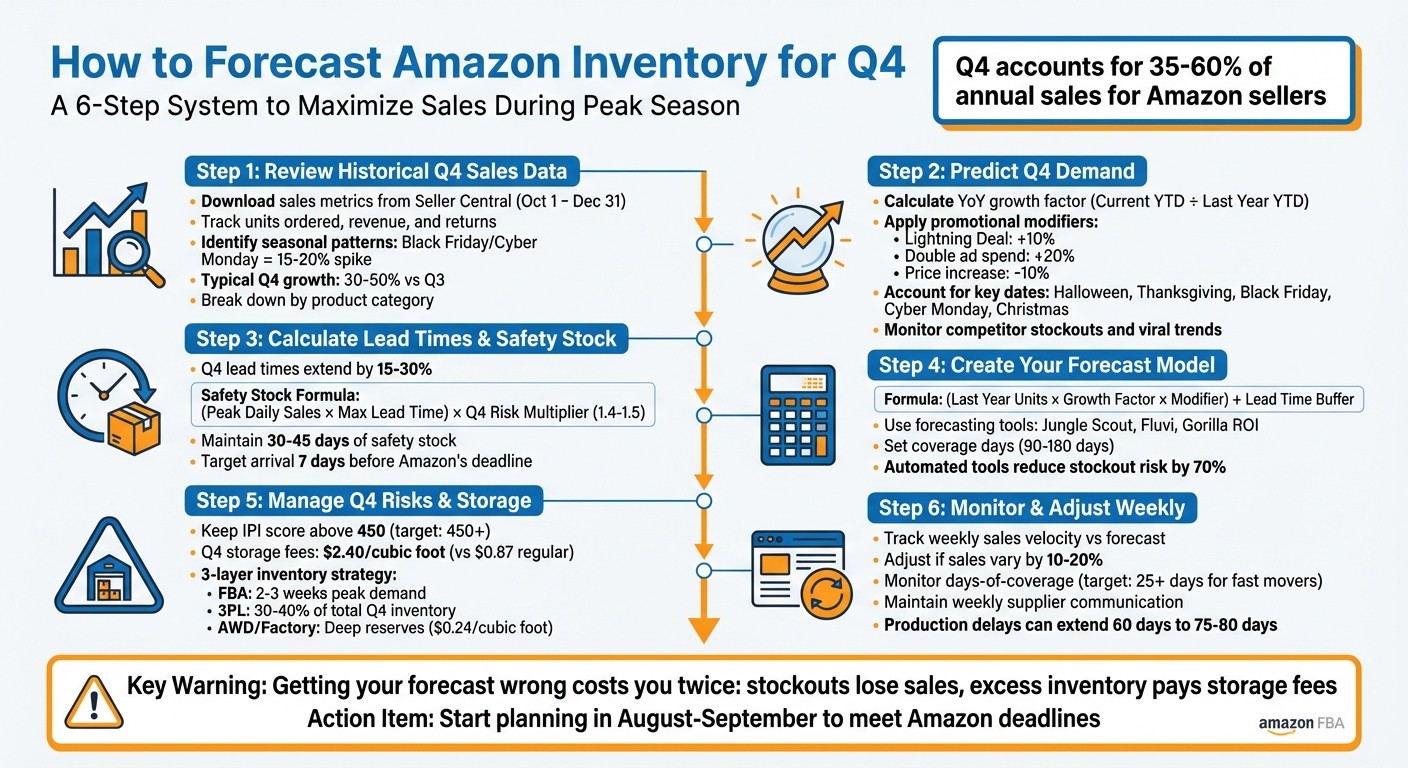
6-Step Amazon Q4 Inventory Forecasting Process for Sellers
Identifying What to Replen in Q4, How to Forecast, and Track Your Profit for Amazon Sellers
Step 1: Review Your Historical Q4 Sales Data
Your past Q4 sales performance is the starting point for creating a reliable forecast. Without a clear understanding of what happened in previous years, you're essentially making an educated guess. As Kaleb, an Amazon Account Manager at Your Seller Sidekick, explains:
"Forecasting isn't guesswork - it's a system."
The first step is to pull detailed sales data from Amazon Seller Central and organize it to uncover demand patterns. Focus on units sold per ASIN for October, November, and December individually instead of treating Q4 as one big block.
Download Sales Metrics from Seller Central
To get started, navigate to Reports > Business Reports > Detail Page Sales and Traffic in Seller Central. Set the date range to October 1 through December 31 for the previous year. Export the data as a CSV file for easy analysis in Excel or Google Sheets.
Make sure to track units ordered, revenue, and returns. For example, if 200 out of 1,000 units sold were returned, your effective demand was 800 units. Overlooking this can lead to overstocking.
If you're a 1P Vendor, you can download similar data from Retail Analytics > Sales > Sourcing View for each month.
Also, account for stockouts. If you ran out of inventory during last year’s Q4, your sales data might not reflect true demand. Estimate those missed sales and adjust your numbers to create a more accurate baseline.
Once your data is ready, the next step is to uncover seasonal trends.
Find Seasonal Sales Patterns
Organizing your data allows you to spot key patterns. For instance, Black Friday and Cyber Monday often cause a 15–20% sales spike. Some products might grow steadily throughout the quarter, while others see sharp increases tied to specific shopping events.
Take note of daily and weekly sales rates to identify when demand starts to pick up. For most sellers, Q4 sales typically rise 30% to 50% compared to Q3.
Be cautious about one-off promotions. Excluding these ensures your baseline isn't inflated by temporary sales boosts.
To adjust last year’s data for this year’s growth, calculate a growth factor. Divide your current year-to-date (YTD) sales by last year’s YTD sales. For example, if your sales are up 25% year-over-year, apply that same growth rate to your historical Q4 numbers.
Break Down Data by Product Category
Different product categories perform differently during Q4, so it's important to analyze them separately. For example, apparel returns can exceed 30%, while electronics return rates hover around 16–20%. Lumping all categories together can obscure these critical differences.
Breaking your data down by category also helps you allocate resources more effectively. With Q4 storage fees jumping from $0.87 per cubic foot to $2.40 per cubic foot for standard-size items, it’s essential to prioritize high-margin, fast-selling products and avoid wasting warehouse space on slow movers.
Category Example | Peak Period | Typical Return Rate |
|---|---|---|
Apparel | Oct - Nov | ~30% |
Electronics | Nov - Dec | ~16–20% |
Fitness Gear | January | Lower (Post-holiday) |
Holiday Decor | Oct - Dec | High (Post-holiday) |
Use the Inventory Health Report in Seller Central to monitor sell-through rates and "weeks of cover" for each category. This will help you gauge how long your current stock will last based on past Q4 trends, allowing you to anticipate shortages before they occur.
These steps will provide the foundation for accurately forecasting Q4 demand.
Step 2: Predict Q4 Demand
Refine your baseline forecast by factoring in current growth trends and strategic plans. Don’t simply reuse last year’s data - adjust it to reflect today’s growth patterns and market dynamics.
Start by calculating a year-over-year (YoY) growth factor. To do this, divide your current year-to-date (YTD) sales by the same period’s sales from the previous year. For instance, if your YTD sales this year total $150,000 compared to $120,000 last year, your growth factor is 1.25, indicating 25% growth.
Next, apply promotional modifiers to fine-tune your forecast. For example:
Add 10% for a Lightning Deal.
Double your ad spend for a 20% increase.
Subtract 10% for price increases.
As Austin Gardner-Smith from Drivepoint explains:
"Amazon inventory forecasting blends your historical sales data with real-time adjustments to predict how much stock you'll need and exactly when you'll need it."
These adjustments ensure your forecast reflects your Q4 strategy, rather than relying solely on past sales trends. With this in place, you can move on to incorporating daily market trends and external factors.
Include Market Trends and Events
Q4 isn’t just a single sales period - it’s made up of distinct events, each with its own demand patterns. Key dates like Halloween, Thanksgiving, Black Friday, Cyber Monday, and Christmas drive unique traffic spikes. Your forecast needs to account for these separately.
For example, in Q4 2022, Amazon reported $149.2 billion in revenue, exceeding expectations. This highlights just how much consumer spending is concentrated in these months. However, not all products see the same demand. Fitness gear often experiences a surge in January as people redeem gift cards and act on New Year’s resolutions.
Another critical factor is search ranking. Over 80% of Amazon sales come from the first page of search results. If your product moves from page 2 to page 1 - whether through better SEO or increased ad spend, or a competitor running out of stock - your demand could spike significantly, even if historical data doesn’t predict it.
Beyond planned events, real-time trends can also drive demand. For instance, a viral TikTok video can send sales skyrocketing overnight. Keeping an eye on platforms where your target audience spends time can help you identify and respond to these trends early.
Account for External Factors
In addition to market-specific events, external circumstances can also impact demand. Economic shifts, new regulations, or social movements can quickly change buying behaviors.
For example, if a competitor runs out of stock during Black Friday, their customers might turn to your product, resulting in an unexpected surge. Similarly, a major advertising push - whether through Amazon PPC or off-platform channels like Facebook or email - can boost sales beyond your baseline forecast.
To avoid stockouts during these demand peaks, sync your marketing and inventory calendars. For instance, if your marketing team plans a 30% off sale for Cyber Monday, your forecast should reflect this spike. Weekly meetings between marketing and operations teams can help ensure alignment on promotions and inventory needs.
Don’t forget to monitor your Inventory Performance Index (IPI) score. If it drops below 450, Amazon may impose storage limits, restricting how much inventory you can send to fulfillment centers during Q4. Even if demand is high, these limits could force you to adjust your forecast downward.
Market Factor | Impact on Forecast | Suggested Action |
|---|---|---|
Planned Promotions | +10% to +30% demand spike | Add sales modifiers to baseline |
Increased Ad Spend | +20% for doubling PPC budget | Adjust forecast upward |
Competitor Stockouts | Unpredictable surge in traffic | Monitor weekly and adjust |
Low IPI Score (<450) | Storage limits cap inventory | Prioritize fast-moving SKUs |
Social Media Virality | Sudden, non-linear spike | Track trends and reorder quickly |
Step 3: Calculate Lead Times and Safety Stock
Once you’ve accounted for market trends, the next step is ensuring your products reach Amazon’s warehouses on time. This means carefully planning lead times and building in enough safety stock to handle unexpected delays.
Plan for Extended Q4 Lead Times
Your lead time needs to cover everything from production to Amazon’s inbound receiving process. This includes production time, freight transit, customs clearance, prep center processing, and the time it takes for Amazon FBA to receive your inventory. During Q4, these steps can take 15–30% longer due to increased congestion.
To hit Amazon’s inbound deadlines, work backward from your target arrival date. For example, if the deadline for Q4 is October 19, 2026, aim to have your inventory arrive at Amazon by October 12, 2026 - seven days earlier. Based on this, your goods should leave the supplier by mid-September. Add a 15–30% buffer to the lead times provided by your supplier to account for potential production delays and processing hiccups.
Consider splitting shipments to balance cost and speed. Use LTL (less-than-truckload) shipping for cost-effective bulk deliveries and small parcel shipments for emergency stock. This strategy reduces the risk of delays by avoiding reliance on one shipping method.
Once you’ve mapped out extended lead times, it’s time to calculate the safety stock you’ll need to guard against disruptions.
Set Safety Stock Levels
Safety stock acts as a cushion during Q4, a period when many sellers generate 35% to 60% of their annual income in just twelve weeks. Running out of stock during this critical time can hurt your search rankings and your Inventory Performance Index (IPI) score.
Here’s a formula to calculate safety stock:
Safety Stock = (Peak Daily Sales × Maximum Lead Time) × Q4 Risk Multiplier
For your best-selling "Hero" products, use a multiplier of 1.4 to 1.5 to account for demand spikes and processing delays. For instance, if your peak daily sales are 50 units and your maximum lead time is 60 days, your safety stock would be:
50 × 60 × 1.5 = 4,500 units.
During Q4, aim to keep 30–45 days of safety stock on hand. This ensures your products remain Prime-eligible and ready for peak shopping periods, such as Black Friday, which can boost sales by 15–20%. As Sean Weeks from eFulfillment Service explains:
"Stockouts cost more than a few weeks of higher storage."
While higher storage fees are a reality in Q4, the cost of lost sales and lower search rankings far outweighs these fees. Keep a close eye on your IPI score - aim for 450 or higher - to avoid restock limits that could delay replenishment when it matters most.
Step 4: Create Your Forecast Model
Once you've analyzed your historical data and estimated Q4 demand, it's time to build your forecast model. This model will help you determine how many units to order and when to place those orders to ensure your inventory flows seamlessly throughout Q4.
Combine Historical Data and Market Projections
Start by setting a baseline using last year's Q4 sales figures - specifically, the units sold in October, November, and December. These numbers reflect the seasonal demand patterns you’re likely to face again. To adjust for current sales levels, apply a growth factor. Calculate this by dividing your current year-to-date (YTD) sales by last year’s YTD sales. For instance, if you sold 10,000 units through September 2025 and 8,000 units through September 2024, your growth factor would be 1.25 (10,000 ÷ 8,000).
Next, include a trend modifier by comparing sales from the most recent six months to the same period last year. A ratio above 1.0 signals growth, while a ratio below 1.0 suggests a slowdown.
Here’s the formula for your monthly forecast:
(Last Year Units × Growth Factor × Modifier) + ((Last Year Units × Growth Factor × Modifier) ÷ 30 × Lead Time Days).
This calculation incorporates both the units you expect to sell during the month and the extra inventory needed to cover your supplier lead time.
Be sure to clean your data by removing anomalies like viral social media spikes or temporary stockouts. These outliers can distort your numbers and lead to overstocking or understocking.
Use Forecasting Tools and Software
While spreadsheets can get the job done, they’re prone to errors and struggle to handle real-time updates - especially if you’re managing multiple SKUs. Automated tools like Jungle Scout, Fluvi, and Gorilla ROI simplify the process by using machine learning to adjust forecasts based on market changes. For example, Jungle Scout’s Inventory Manager (available in its Suite and Professional plans) pulls real-time data from your FBA levels and historical sales. Fluvi, on the other hand, offers a free trial and focuses on data-driven forecasts.
Set your tools to base orders on coverage days (e.g., 90 or 180 days) rather than unit counts. This ensures your stock lasts through the Q4 peak. You can also configure automated alerts for statuses like "Reorder Now" or "Reorder Soon" based on your sales velocity and supplier lead times.
As Bob Norberg from RestockPro puts it:
"The difference between top sellers and everyone else isn't effort… It's automation."
While these tools handle much of the heavy lifting, don’t forget to manually adjust for specific factors like planned Amazon deals and promotions or increased ad spend. Share your forecasts with suppliers early so they can secure production capacity and raw materials for Q4. Poor forecasting leads to 15–20% of lost revenue in e-commerce, but automated systems can cut stockout risks by up to 70%.
For expert guidance in fine-tuning your Q4 inventory forecast, consider reaching out to eStore Factory.
With your forecast model ready, the next step is to tackle Q4 risks and storage challenges to keep your operations nimble.
Step 5: Manage Q4 Risks and Storage
Once your forecast model is ready, the next step is to tackle inventory risks and storage. During Q4, Amazon's fulfillment network faces heavy strain, and poor storage management can lead to blocked replenishments and high fees. Staying ahead of these challenges is key to a smooth holiday season.
Keep an Eye on Amazon Storage and IPI Scores
Your Inventory Performance Index (IPI) score plays a big role in whether you can send inventory to FBA during Q4. Amazon requires a score of at least 400 to avoid storage restrictions, but aiming for 450 or higher gives you more flexibility during the busiest time of the year. The IPI score ranges from 0 to 1,000 and is based on four factors:
Excess inventory (40–45% of your score)
Sell-through rate (30–35%)
Stranded inventory (15–20%)
In-stock rate (10–15%)
Check your Inventory Performance Dashboard in Seller Central every Tuesday morning to monitor your 90-day performance. Address stranded inventory (units in storage without active listings) within 24 to 48 hours, as these items not only rack up fees but also lower your score. For seasonal products you won’t replenish after December, mark them as "non-replenishable" to avoid hurting your in-stock rate.
Q4 brings higher storage fees - standard-size storage costs triple. If any inventory sits at a 60-day supply without strong sales, consider launching coupons (10–20% off) or Amazon Outlet deals before it’s flagged as "excess" at 90 days. Additionally, keep in mind that aged inventory surcharges start after 181 days, so it’s best to liquidate slow sellers before they become a financial burden.
Diversify Fulfillment with Multiple Options
Relying solely on FBA during Q4 can be risky. A three-layer inventory strategy helps spread your stock across different fulfillment channels, reducing the chances of bottlenecks. Here’s how it works:
Keep 2 to 3 weeks of peak demand inventory in FBA for Prime sales.
Store 30–40% of your total Q4 inventory with a third-party logistics (3PL) provider for quick replenishment.
Use Amazon Warehousing & Distribution (AWD) or your factory for deep reserves.
AWD is a cost-effective option at around $0.24 per cubic foot, and it doesn’t impact your IPI score. It can also automatically replenish your FBA stock, helping you stay under capacity limits while avoiding stockouts. For slower-moving items, maintain FBM (Fulfillment by Merchant) listings as a backup. If your FBA stock runs out or hits capacity limits, FBM allows you to keep your listings active and protects your Best Sellers Rank (BSR).
Ken Zhou, Chief Operating Officer at My Amazon Guy, highlights the importance of this approach:
"Relying only on FBA can backfire when storage fees rise or warehouses get congested. Having FBM or a 3PL partner ready keeps your business moving when Amazon slows down."
Step 6: Monitor and Adjust Weekly
Keeping a close eye on your forecast every week is critical. Q4 demand can change rapidly, and what seemed spot-on a few weeks ago might no longer reflect reality. Weekly reviews help you stay ahead of potential stockouts or unnecessary storage fees.
Track Weekly Sales and Inventory Levels
Start by monitoring your weekly sales velocity - compare your daily sales data against your forecast. If sales are running 10–20% higher than expected, adjust your forecast immediately to initiate earlier reorders. On the flip side, slower-than-expected sales might mean delaying shipments to avoid tying up cash in excess inventory.
To get a more accurate picture of your regular demand, exclude anomalies like one-time sales spikes or out-of-stock days when calculating velocity. This approach provides a clearer view of your normal sales patterns.
Your days-of-coverage metric is another key tool. By dividing your total inventory (available, reserved, and inbound) by your weekly sales velocity, you can estimate how long your stock will last. For fast-moving products, aim to keep at least 25 days of stock on hand. If it drops to 18 days, take it as a warning signal. Keep in mind that during peak seasons, Amazon's receiving times can double, so having a healthy inventory buffer is crucial.
Pay close attention to your reserved inventory. Units might be moved between fulfillment centers without being tied to actual customer orders. To get an accurate count of available stock, subtract customer orders from your reserved inventory. Automating low-stock alerts in Seller Central can also help you stay on top of critical reorder windows.
By making these weekly adjustments, you can better align your stock levels with the ever-changing Q4 demand and maintain smooth communication with your suppliers.
Stay in Contact with Suppliers
Equally important is staying in regular contact with your suppliers. During Q4, production timelines that usually take 60 days can stretch to 75–80 days due to shifting priorities and material shortages. Weekly updates with your suppliers on production and shipping schedules can help you avoid delays.
If your sales velocity is increasing, notify your supplier right away so they can secure additional raw materials and adjust production capacity. Similarly, if demand slows, scaling back orders can prevent overstocking. Work backward from your target in-stock date, factoring in extra time for production, freight, customs, and processing to avoid bottlenecks.
For more help refining your Q4 inventory strategy, check out the expert Amazon consulting services offered by eStore Factory.
Conclusion
Q4 inventory forecasting combines historical sales data, growth trends, and marketing strategies to prepare for the busiest time of the year. To avoid last-minute chaos, start planning as early as August or September to meet Amazon FBA seller deadlines and sidestep peak-season delays.
"Getting your Amazon inventory forecast wrong costs you twice: once when you're out of stock and losing sales, and again when you're sitting on excess inventory paying storage fees." - Austin Gardner-Smith, Drivepoint
Flexibility is key during Q4, as demand often spikes 2–3 times during Prime events and holiday shopping peaks. Referencing a holiday calendar can help you track these critical dates. A multi-channel fulfillment plan - leveraging FBA along with 3PL buffers or FBM backups - can protect your operations if restock limits tighten or shipping delays occur. Also, maintaining an Inventory Performance Index above 450 helps you avoid storage restrictions.
To navigate Q4 successfully, focus on a well-rounded approach. Build a solid forecast model, manage risks effectively, and adapt your strategies as needed. Make data-driven decisions to safeguard your profits and keep your account in good standing. Regularly monitor sales velocity, align inventory forecasts with promotions, and maintain clear communication with suppliers. Since Q4 often accounts for 35% to 60% of annual revenue for many sellers, accurate forecasting can mean the difference between a record-breaking quarter and missed opportunities.
Need expert guidance to fine-tune your Q4 inventory strategy and maximize holiday sales? Check out eStore Factory.
FAQs
How can I adjust my Amazon inventory forecast to handle unexpected demand spikes during Q4?
To fine-tune your inventory forecast for those unexpected Q4 demand surges, start by diving into your historical sales data from past holiday seasons. Look for patterns and use these insights to calculate an annual growth rate that aligns with your business's current performance.
Don’t forget to consider seasonal trends. Adding a safety stock buffer is a smart move - this extra inventory acts as a cushion to handle unexpected spikes in demand, helping you avoid stockouts. Keep a close eye on sales figures throughout Q4, making adjustments to your inventory plans as real-time data rolls in.
By combining past trends, growth estimates, and a well-thought-out safety stock, you can reduce the risk of running out of inventory while taking full advantage of the busiest shopping season of the year.
How can I manage lead times and prevent stockouts during the busy Q4 season?
To handle lead times and avoid stockouts during the busy Q4 season, start by focusing on demand forecasting. Dive into your historical sales data, analyze market trends, and review last year’s holiday numbers to estimate how much inventory you'll need. Don’t forget to factor in growth patterns and any upcoming promotions to make your projections as accurate as possible.
Next, coordinate closely with your suppliers. The holiday rush often means longer production and shipping times, so plan ahead to avoid delays. Set safety stock levels to cushion against unexpected demand surges. Using inventory management tools can also simplify forecasting and make reordering more efficient.
Finally, keep a close eye on your inventory levels throughout the season. Track real-time sales data and adjust your strategy as needed. This hands-on approach will help you maintain the right stock balance, prevent costly stockouts, and avoid being stuck with too much leftover inventory after the holidays.
What is the Inventory Performance Index (IPI) and how does it affect inventory management during Q4?
The Inventory Performance Index (IPI) is a vital metric Amazon uses to measure how well you handle your inventory. It takes into account things like keeping stock levels balanced, reducing excess inventory, and maintaining strong product sales.
Having a high IPI score becomes especially important in Q4, when the holiday season drives up demand. A better score can help you avoid storage limits, steer clear of overstocking fees, and keep your products available for eager shoppers. To keep your IPI in good shape, focus on tracking your inventory closely, cutting down on unsold items, and boosting your sell-through rates.






