


E-Commerce Strategies
Want better Amazon ad performance? It starts with placement. Ads in the Top of Search consistently outperform other placements, with higher click-through rates (up to 4.11%), better conversion rates (13%-15%), and a lower ACoS (~25%). Compare this to Rest of Search (CTR: 0.2%-0.73%, CVR: 8%-10%, ACoS: ~30%) or Product Pages (CTR: 0.15%-0.4%, CVR: 6%-9%, ACoS: ~34.5%).
Here’s what you need to know:
Top of Search is ideal for product launches, high-intent keywords, and brand defense.
Rest of Search works well for long-tail keywords and niche products with lower competition.
Product Pages are best for competitor targeting, cross-selling, and retargeting.
Key Tip: Use Amazon's bid multipliers (up to 900%) to prioritize high-performing placements. Regularly analyze placement reports and adjust bids every 14 days to optimize for ACoS and ROAS. A structured campaign strategy, like separating campaigns by placement performance, ensures better control and profitability.
Pro Insight: Daily monitoring of CTR, CVR, and ACoS can help you fine-tune bids and avoid wasted spend. Keep campaigns simple, focus on high-performing keywords, and adjust incrementally (5%-10%) for the best results.
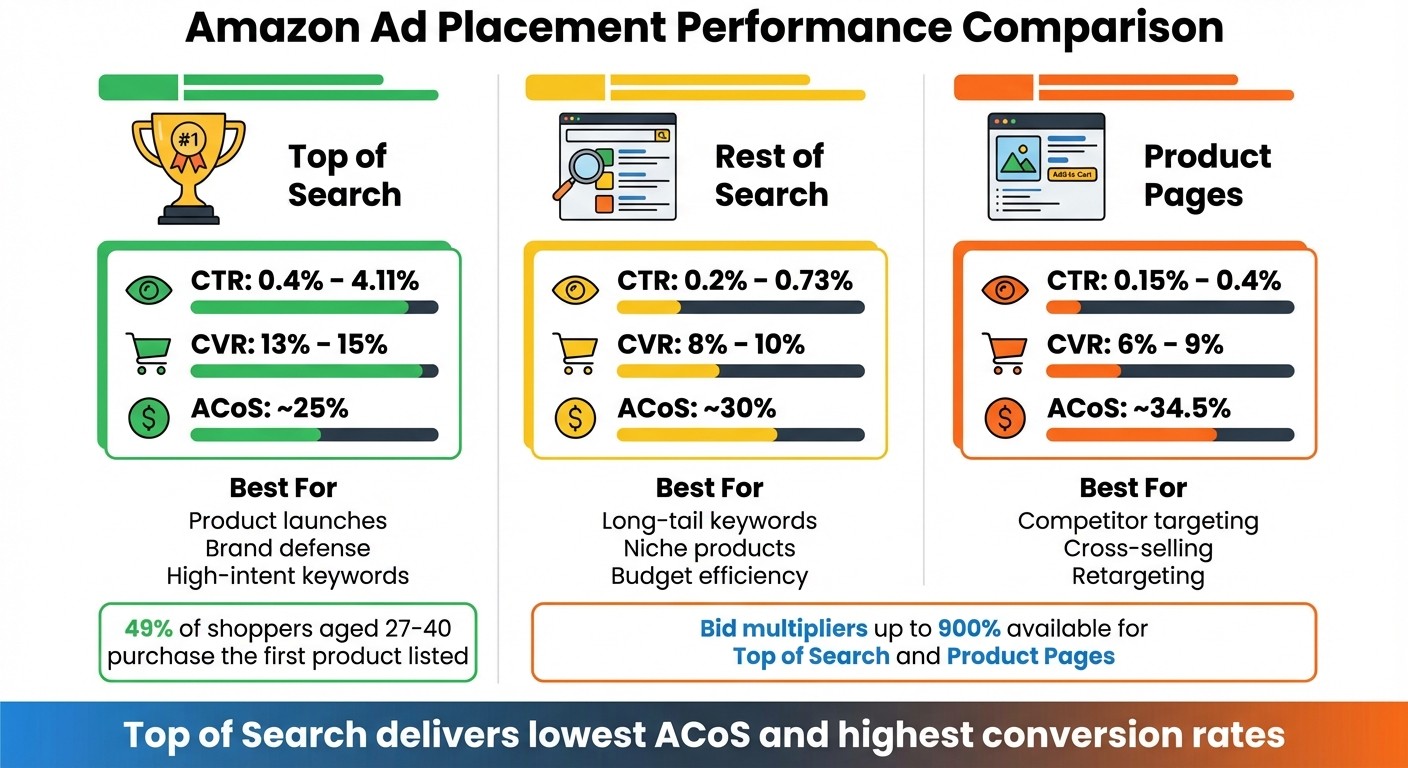
Amazon Ad Placement Performance Comparison: CTR, CVR, and ACoS by Placement Type
Amazon Sponsored Products Placement Optimization: Real Numbers Analysis
Amazon Ad Placement Types
Amazon provides three primary ad placement options, each designed to suit different strategies and goals. Knowing how these placements perform can help you allocate your advertising budget more effectively.
Top of Search
Top of Search (TOS) ads appear in the first few spots on page one of Amazon’s search results - prime territory for visibility. These ads are shown to shoppers actively searching for products like yours, which is why they tend to deliver the best performance among all placements.
TOS placements typically achieve click-through rates (CTRs) between 0.4% and 4.11% and conversion rates (CVRs) ranging from 13% to 15%. The average advertising cost of sales (ACoS) for this placement is about 25%, making it a cost-efficient option despite its higher cost per click. Notably, 49% of shoppers aged 27–40 purchase the first product listed, highlighting the importance of this placement.
"Top of Search had the most sales and lowest ACoS amongst 5 brands... almost universally, Top of Search was the best performing placement amongst other sellers." - Dave Bryant, EcomCrew
TOS is ideal for product launches, brand defense campaigns, and high-intent keywords where maximum visibility is crucial. However, if your organic rankings are already strong and your ACoS starts climbing without a matching increase in sales, you might be paying for traffic you’d get organically.
Rest of Search
Rest of Search (ROS) placements appear mid-page or on subsequent pages of search results. These ads cater to shoppers who prefer browsing through multiple options before deciding, offering a balance between cost and reach.
ROS placements generally see CTRs between 0.2% and 0.73% and CVRs of 8% to 10%. The average ACoS is about 30%, which is slightly higher than TOS but still competitive. The lower cost per click makes this placement a good choice for advertisers working with limited budgets or testing new keywords.
This placement works particularly well for long-tail and niche keywords with less competition. It’s also effective for established products that don’t require aggressive visibility but still benefit from consistent exposure.
Product Pages
Product Page (PDP) placements display ads directly on competitor listings, often appearing near bullet points or A+ content. These ads target shoppers who are already comparing products and are close to making a purchase decision.
PDP placements have the lowest engagement metrics, with CTRs between 0.15% and 0.4% and CVRs of 6% to 9%. The average ACoS is around 34.5%, making it the least efficient placement in terms of cost. However, this placement is strategic for certain goals.
PDP ads are particularly effective for competitor conquesting, where you target rival listings to highlight your product’s advantages, such as better reviews or lower prices. They’re also useful for cross-selling complementary products or retargeting shoppers who’ve already shown interest in your category. While the conversion rates may be lower, these ads can help build brand awareness and capture shoppers at the decision-making stage.
Placement Type | Avg. CTR | Avg. CVR | Avg. ACoS | Best For |
|---|---|---|---|---|
Top of Search | 0.4% – 4.11% | 13% – 15% | ~25% | Product launches, brand defense, high-intent keywords |
Rest of Search | 0.2% – 0.73% | 8% – 10% | ~30% | Long-tail keywords, niche products, budget efficiency |
Product Pages | 0.15% – 0.4% | 6% – 9% | ~34.5% | Competitor targeting, cross-selling, retargeting |
Amazon allows bid multipliers of up to 900% for TOS and PDP placements, giving you the ability to fine-tune ad positioning. Start with a 20%–50% bid adjustment for new products and refine weekly based on your return on ad spend (ROAS) and ACoS. Next, we’ll look at how Amazon PPC optimization and placement reports can guide these bid adjustments for better results.
Analyzing Placement Reports
Placement reports provide insights into ad performance across different placements, helping you allocate your budget to the spots that drive the most conversions.
How to Access Placement Data
To access this data, log in to Seller Central and navigate to Advertising > Campaign Manager > Measurement and Reporting. From there, select Sponsored Ads Reports. Choose Sponsored Products as the report type, set Placement as the focus, and select either Summary or Daily data for a minimum of 14 days. Once the report is ready, download the CSV file.
Keep in mind that Amazon offers a 90-day lookback window for placement reports, so anything older than three months won't be available. To stay on top of your data, schedule reports weekly or bi-weekly. For campaigns with significant budgets, daily reviews are ideal, while bi-weekly reviews work for moderate budgets, and monthly reviews suffice for stable campaigns. These reports are the cornerstone of fine-tuning your bidding strategy.
Metrics That Matter
When analyzing placement reports, focus on key metrics like Impressions, CTR, CVR, ACoS, and ROAS:
Impressions: These indicate if your bids are competitive enough to secure ad placements. Low impressions often point to bids that are too low.
Click-Through Rate (CTR): This measures how relevant your ad is to shoppers. If impressions are high but CTR is low, it’s a sign that your ad might not be resonating with the audience.
Conversion Rate (CVR): This tells you which placements are driving sales. A high CVR can justify increasing bid multipliers, even if the cost per click is slightly higher.
Advertising Cost of Sales (ACoS): This metric compares ad spend to sales revenue, showing how efficiently your ads are performing. For example, in April 2025, a fitness resistance band seller found that Top of Search placements had a 5.2% CTR, 14% CVR, and 38% ACoS, while Product Pages had a 1.8% CTR and 24% ACoS. By adjusting bid multipliers - raising Top of Search by 50%, increasing Product Pages by 30%, and reducing Rest of Search by 20% - the seller reduced Top of Search ACoS to 30% and improved overall profitability by 18% in just 14 days (Source: Clear Ads Agency, 2025).
Return on Ad Spend (ROAS): This provides a clear view of profitability. High-ROAS placements should get more budget, while low-ROAS placements may need bid reductions or even pausing.
If you notice a high CTR but a low CVR, the issue might lie within your product listing optimization - things like images, pricing, or reviews may need attention. Amazon also filters out fraudulent or invalid clicks, which can cause small fluctuations in your metrics over time. For this reason, it’s best to use at least 14 days of data before making major bid adjustments. These metrics lay the groundwork for optimizing your bid multipliers and campaign structure, which will be explored further in the next section.
Placement Optimization Strategies
After analyzing your placement data, the next step is fine-tuning your bids to prioritize the most effective placements. Amazon's Adjust Bids by Placement feature allows you to increase bids for specific locations - like Top of Search and Product Pages - by anywhere from 0% to 900%, all without altering your base bid. This tool gives you precise control over ad visibility and spend. Now, let’s break down strategies for each placement type.
Adjusting Bids for Top of Search
Top of Search placements often yield the lowest ACoS and highest conversion rates compared to other placements. For instance, data shows that Top of Search delivers a 13.51% conversion rate, far outperforming Rest of Search at 2.95% and Product Pages at 1.39%[1].
To determine the right bid adjustment, apply this formula: (High conversion rate / Low conversion rate) - 1. For example, if Top of Search converts at 10% and Rest of Search at 5%, a 100% bid increase makes sense. Since Amazon doesn’t allow negative adjustments for underperforming placements, start with a low base bid suitable for Rest of Search, then use multipliers to hit your target cost-per-click for Top of Search. For campaigns with multiple keywords, calculate individual bids using: (Revenue Per Click × Target ACoS) / (1 + ToS Increase % × ToS Click-Share %)[1].
Make it a habit to review placement performance reports every two weeks and tweak your multipliers as your ACoS goals evolve. If branded keywords are part of your Amazon SEO and PPC strategy, consider moving them to separate campaigns - they can skew Top of Search metrics, making it harder to gauge non-branded keyword performance accurately.
Improving Rest of Search Results
Rest of Search includes all sponsored results below the top row, spanning the middle and bottom of page one and all subsequent pages. These placements are less competitive and typically offer the lowest cost-per-click among the three primary options.
Since 2024, Amazon has enabled bid modifiers for Rest of Search placements[2]. If you notice your Top of Search ACoS climbing without a corresponding increase in sales, it might be time to shift part of your budget to Rest of Search campaigns. This is particularly effective for targeting long-tail keywords. Base your keyword bids on Rest of Search performance, and use modifiers to increase bids selectively. This approach works well for niche products where Top of Search bids might be too expensive to maintain profitability.
Maximizing Product Page Placements
Product Page ads target shoppers in the consideration stage, making them perfect for upselling, cross-selling, and protecting your brand’s visibility. These placements allow you to showcase your product range and prevent competitors from siphoning off your traffic.
To optimize Product Page performance, consider increasing bids on your own product pages. This ensures your products dominate the space while showcasing complementary items. Before raising bids, confirm that the products meet essential quality benchmarks - such as at least five reviews, a 3.5-star rating, and four high-quality images - to boost conversion rates. Use your search term report to identify complementary products that drive sales, and create manual campaigns to promote those items. When launching new products through category targeting, start with lower bids to account for typically lower conversion rates. As with other placements, review performance reports every two weeks and adjust bid multipliers to align with your ACoS goals.
Campaign Structure for Better Placement Control
If you’ve pinpointed which placements deliver the best results, the next step is to restructure your campaigns for more control. Disorganized campaigns can lead to poor optimizations, wasting both time and money. A well-structured campaign setup ties together your placement analysis and bidding strategies, ensuring smoother adjustments and better performance.
Separating Campaigns by Placement Performance
Start by dividing your campaigns based on placement performance. Use your placement reports to identify keywords that consistently show high conversion rates and low ACoS. Once you’ve found these high performers, move them into dedicated campaigns with higher budgets to maximize their potential.
This approach follows the "Peel, Stick, and Block" strategy. Here’s how it works:
Peel: Extract high-performing keywords from your automatic campaigns.
Stick: Place these keywords into focused manual campaigns for better control.
Block: Add them as negative keywords in the original campaigns to avoid internal competition.
For instance, if a keyword delivers a 25% ACoS in the Top of Search placement but is buried in a crowded campaign, isolating it allows you to set specific placement multipliers and allocate an appropriate budget.
Keep ad groups simple to avoid spreading your data too thin. Assign each product group - such as parent products and their variations - to its own ad group. This makes it easier to adjust bids based on individual performance metrics like conversion rates and price points. For long-term clarity, use straightforward naming conventions like "Product_Category_TargetingType."
Using Auto and Manual Campaigns Together
Once you’ve set up dedicated campaigns, combine automatic and manual campaign strategies to strike a balance between discovery and precision. Automatic campaigns are great for uncovering new keyword opportunities and gathering broad placement data, while manual campaigns let you fine-tune placement bids - up to 900% for Top of Search or Product Pages.
To streamline this process, try structure mirroring. Create manual campaigns that mimic the structure of your automatic campaigns for each product cluster. This ensures that any keywords you transfer from automatic to manual campaigns stay relevant to the product group, making it easier to compare performance data. For example, if a promising keyword in an automatic campaign isn’t getting impressions due to budget limitations, moving it to a manual campaign ensures it gets the attention it deserves.
Experiment with different bidding strategies across your campaign pairs. Here are three options to consider:
Dynamic Bidding (Up and Down): Amazon’s AI can increase bids by up to 100% for placements likely to convert.
Dynamic Bidding (Down Only): Protects your budget by lowering bids when conversions are less likely.
Fixed Bidding: Gives you complete control but requires manual adjustments, especially for placement multipliers.
Testing these strategies can help you find the right balance between automation and manual control, ensuring your campaigns are both efficient and effective.
Tracking Performance and Making Adjustments
Once you've set up an optimized campaign structure, the next step is keeping a close eye on how it performs. Regular tracking is key to fine-tuning your bidding strategy. Without it, you're essentially flying blind, relying on Amazon's algorithm to make decisions that might not align with your profit goals.
Daily Performance Monitoring
Check your Campaign Manager every day to spot potential problems early. Pay attention to metrics like Impressions, Click-Through Rate (CTR), and ACoS (Advertising Cost of Sales). For instance, if your ad is getting plenty of impressions but your CTR is under 0.29%, it’s a sign that shoppers aren’t engaging. This usually points to issues with your product image or title rather than your bid amount.
To dive deeper, use Reports > Advertising Reports > Create Report in Seller Central to access placement data. The Placement Report helps you see how your ads perform in different locations, such as the Top of Search versus other placements. This data is crucial for tweaking placement multipliers and optimizing performance.
"If you don't monitor Amazon PPC campaigns properly, you're basically burning cash." - Steven Pope, Founder, My Amazon Guy
Set budget rules to automatically increase your spend when performance hits certain thresholds. This ensures you don’t miss out on sales during unexpected traffic spikes. Also, double-check that your products are in stock and eligible to win the Featured Offer daily. Ads for out-of-stock items or those not winning the Featured Offer waste money.
These daily insights will help you make the incremental bid adjustments discussed below.
Making Small Bid Changes
Use the data you gather daily to make thoughtful, incremental adjustments to your bids. Aim for changes in the range of 5–10% to maintain stability. Large shifts can lead to unpredictable performance swings, making it harder to figure out what’s actually effective. For example, if a keyword is driving conversions at the Top of Search but your ACoS is climbing, try lowering the base bid by 5% while keeping your placement multiplier unchanged.
Give your changes time to show results - wait 30–60 days before making any major adjustments. To avoid overpaying for clicks, use this formula to calculate your bid ceiling:
Max Bid = Revenue Per Click (RPC) × Target ACoS%
During peak shopping events like Prime Day, consider increasing your bids by 20–50% to stay competitive. Afterward, scale back by 10–20% during slower periods to conserve your budget. These small, calculated changes can make a big difference in maximizing your ad spend.
Conclusion
Placement reports make one thing clear: optimization thrives on data, not guesswork. For instance, Top of Search placements typically deliver an ACoS of about 25%, compared to 34.5% on Product Pages. This difference more than justifies bid adjustments of up to 900% for top-performing placements.
But it’s not just about bids - your campaign structure plays a big role too. Consider using the "Peel, Stick, and Block" strategy: pull high-performing keywords from automated campaigns, move them into manual campaigns for better control, and block them in the original campaigns. This method pairs perfectly with a dynamic bidding strategy, ensuring your ad spend targets clicks that truly convert.
Optimization isn’t a one-and-done task. Make incremental bid adjustments of 5–10% and review your metrics every two weeks. Allow at least 30 days to see meaningful results. Take Vitasei as an example: they achieved an incredible 1,800% increase in PPC sales by combining PPC optimization techniques, a well-structured campaign setup, and regular monitoring.
If you're looking for expert guidance to fine-tune your Amazon Sponsored Product campaigns, check out eStore Factory. They offer tailored consulting services to help you implement these strategies effectively.
Start with these core practices, experiment to find what works best for your products, and refine based on actual performance data. A data-driven, flexible strategy is your key to mastering Sponsored Product placements - and the ROI will follow.
FAQs
How can I choose the best ad placement for my Amazon product?
Selecting the right ad placement boils down to your advertising goals and the data you gather along the way. If your primary focus is on getting maximum visibility and boosting click-through rates (CTR), Top of Search placements are your best bet. These ads sit at the prime spot on search results pages, making them excellent for driving quick sales - though they often come with a higher price tag. On the other hand, if you're aiming to reach shoppers who are closer to making a purchase, Product Detail Page ads are a smart choice. These ads appear on competitor product pages, giving you a chance to sway potential buyers. For those looking to stretch their budget and gain more affordable impressions, Rest of Search placements can be a practical option.
To get the most out of your campaigns, consider running A/B tests to evaluate how different placements perform. Keep a close eye on key metrics like CTR and conversion rate (CVR), and shift more of your budget toward the placements that deliver the strongest results. Regularly reviewing performance and fine-tuning your strategy is essential to maximizing ROI for your Sponsored Product campaigns.
What are bid multipliers, and how can they improve my Sponsored Product ad performance?
Bid multipliers let you tweak your base bids by a percentage for specific Amazon ad placements like Top of Search, Rest of Search, or Product Pages. By raising bids for placements that perform well and lowering them for weaker ones, you can focus your ad spend on areas that deliver the most value while cutting back on less effective spots.
This approach helps you make smarter use of your ad budget, leading to a better ACoS (Advertising Cost of Sales) and stronger returns on your investment.
How often should I review placement reports to refine my ad strategy?
To get the most out of your Sponsored Product ads, make it a habit to check your placement reports weekly. This regular review allows you to spot trends, fine-tune your bids, and refine your approach based on performance insights.
By keeping a close eye on these reports, you can make smarter adjustments that boost visibility and ROI, ensuring every dollar of your ad budget works harder for you.






