


E-Commerce Strategies
Securing your Amazon SP-API integration is non-negotiable if you want to protect sensitive business and customer data. Amazon’s SP-API handles critical information, including payment details and customer addresses, making it a prime target for cyber threats. Without proper security measures, your integration risks credential theft, data breaches, and compliance violations.
Here’s what you need to know:
OAuth 2.0 Authentication: Use token-based access for secure and flexible authorization.
Credential Management: Keep client IDs and secrets secure using tools like AWS Secrets Manager.
Token Handling: Regularly refresh tokens and store them securely in encrypted databases.
Encryption: Encrypt all data in transit (TLS 1.2 or higher) and at rest (AES-256 recommended).
Role-Based Access Control (RBAC): Assign permissions based on roles to limit data access.
Regular Scans and Tests: Conduct vulnerability scans every 180 days and annual penetration tests.
Incident Response: Have a documented plan to address security breaches within 24 hours.
Amazon Selling Partner API (SP-API) | Introduction to SP-API Security Compliance
Setting Up OAuth 2.0 Authentication
OAuth 2.0 enables secure, token-based access to seller data. Unlike the older signature-based system from Amazon MWS, OAuth 2.0 offers a safer and more flexible approach. It uses a multi-step process involving authorization codes, client IDs, and client secrets to ensure only authorized applications can access data. With its role-based tokens, it also minimizes risks like CSRF attacks by providing granular access control.
How OAuth 2.0 Works
In the SP-API ecosystem, OAuth 2.0 revolves around three types of tokens, each serving a specific purpose with a defined lifespan:
Authorization code (
spapi_oauth_code): Issued by Amazon when a seller approves your app, it expires in just 5 minutes.Refresh token: A long-lived token that doesn’t expire and is used to request new access tokens.
Access token: Valid for 1 hour, this token is included in the
x-amz-access-tokenheader for every API call.
For public applications, the authorization process begins with Login with Amazon (LWA). Sellers can authorize your app through the Selling Partner Appstore or your website. Once authorized, Amazon redirects the seller to your redirect URI, providing the authorization code and a state parameter. You must immediately validate the state parameter to confirm the request's integrity, then exchange the authorization code for tokens within the 5-minute window. Token exchanges happen through the LWA endpoint: https://api.amazon.com/auth/o2/token.
"OAuth 2.0 provides a more secure, standardized authorization method for third-party applications to access seller data via SP-API." – Natalia Kovalchuk, API2Cart
Securing Client IDs and Secrets
Your Client ID and Client Secret are the backbone of your app’s identity, and keeping them secure is critical. Amazon’s Data Protection Policy strictly prohibits hardcoding these credentials in your source code, configuration files, or documentation. Any exposure of these credentials results in automatic rotation, which could lead to service interruptions.
To keep your credentials safe:
Use a secure credential store, like AWS Secrets Manager, and retrieve credentials at runtime via API calls rather than embedding them in code.
Limit access to the credential store to authorized resources and personnel only. Encrypt stored credentials with strong encryption algorithms and enable logging and monitoring for all access attempts.
During the OAuth flow, set the
Referrer-Policy: no-referrerHTTP header to prevent authorization details from being exposed via referrer headers.Generate a unique, short-lived state parameter for every authorization request and verify it when Amazon redirects the seller back to your app.
Keep your code repositories private and use scanning tools to catch any accidentally committed credentials.
Maintain separate environments for testing and production to ensure credentials from one environment cannot compromise the other.
Managing and Refreshing Tokens
Once you've set up OAuth securely, the next step is managing tokens to ensure uninterrupted access to services. After obtaining tokens via OAuth 2.0, the challenge lies in maintaining secure and continuous functionality. Access tokens are valid for exactly 3,600 seconds (one hour), while refresh tokens don’t have a set expiration date. However, for public applications, selling partners must reauthorize them every 365 days. To avoid disruptions, your application needs a solid token management system.
Understanding Access Token Lifespan
Access tokens have a one-hour lifespan, creating a predictable refresh cycle. You can choose between two approaches: proactive refreshing, where tokens are exchanged just before expiration, or reactive refreshing, where tokens are exchanged after a 401 error. Most developers lean toward the reactive method because it’s simpler and avoids unnecessary API calls.
When using reactive refreshing, a resilience framework like Polly can automate handling 401 errors. Here’s how it works: your application makes an SP-API call, receives a 401 response, exchanges the refresh token at the LWA endpoint (https://api.amazon.com/auth/o2/token), saves the new access token, and retries the original request. The token exchange process requires these four parameters:
grant_type(set torefresh_token)Your stored
refresh_tokenYour
client_idYour
client_secret
"Refresh tokens do not expire. No application update is required. The application management page no longer displays an expiration date." – Amazon SP-API Documentation
For public applications, keep track of the 365-day reauthorization requirement. Automate reminders to notify selling partners to reauthorize before the deadline. The reauthorization process is similar to the initial OAuth flow: sellers reauthorize your app, Amazon provides a new authorization code, and you exchange it for a fresh refresh token within five minutes.
With token lifecycles covered, the next priority is ensuring secure token storage.
Best Practices for Token Storage
Avoid storing tokens in client-side code, logs, or URLs. Amazon’s Data Protection Policy strictly prohibits this and can result in automatic credential rotation if violated. Instead, store refresh tokens securely in an encrypted database using at least AES-128 or RSA-2048 encryption. AWS Secrets Manager is a great option, as it manages encryption, rotation, and access control for you.
When refreshing tokens, update your database immediately with the new access token to prevent issues caused by outdated tokens. Conduct quarterly access reviews and revoke token access within 24 hours if an employee leaves your organization. Amazon also advises rotating encryption keys every 180 days and notes that when you rotate LWA client secrets via the Developer Console, the old credentials remain valid for seven days.
"The best way to avoid such stressful interruptions to your business is to avoid hardcoding your credentials." – Amazon SP-API Technical Paper
Encrypting Data in Transit and at Rest
Keeping data secure, whether it's moving or stored, is a top priority. Amazon's Data Protection Policy strictly requires encryption for all Amazon Information in transit and all Personally Identifiable Information (PII) at rest. This means encrypting API calls, database entries, and file transfers without exception.
Using HTTPS for API Calls
All SP-API calls must use HTTPS with TLS 1.2 or higher. Amazon does not allow unencrypted HTTP connections - these are completely blocked. TLS encryption ensures that data traveling between your application and Amazon's servers is protected from interception or tampering. This encryption requirement applies not only to external API calls but also to internal communication channels, storage layer nodes, and operational tools.
If TLS encryption ends at an intermediary, you must implement message-level encryption using tools like the AWS Encryption SDK. This approach encrypts the data payload itself before transmission, keeping it secure even if the TLS session terminates at an intermediary point. To further enhance security, eliminate any unsecured endpoints, disable unused communication channels, and ensure your firewall rules block all HTTP traffic.
Once data is securely transmitted, safeguarding it at rest is just as important.
Encrypting Stored Data
PII stored at rest must be encrypted using AES-128 or larger keys (AES-256 is recommended) or RSA with 2048-bit keys or higher. Amazon emphasizes a layered security approach, requiring encryption both before and during storage. For example, you can enforce S3 bucket policies to block uploads of unencrypted data.
Avoid storing PII on USB drives, personal devices, or unsecured cloud storage. Instead, use envelope encryption to balance performance with security. This method involves encrypting data with a symmetric key and then encrypting that key with a master key managed by AWS KMS or a similar service. To maintain security, restrict access to cryptographic keys, rotate them regularly, and never hard-code them into your application. Additionally, retain security logs for at least 90 days to monitor data access and support investigations if needed.
Encryption Standard | Minimum Requirement |
|---|---|
AES | 128-bit keys (256-bit preferred) |
RSA with OAEP | 2048-bit keys |
TLS | Version 1.2 or higher |
AES-GCM | 128-bit tag length with 96-bit random IV |
Setting Up Role-Based Access Control (RBAC)
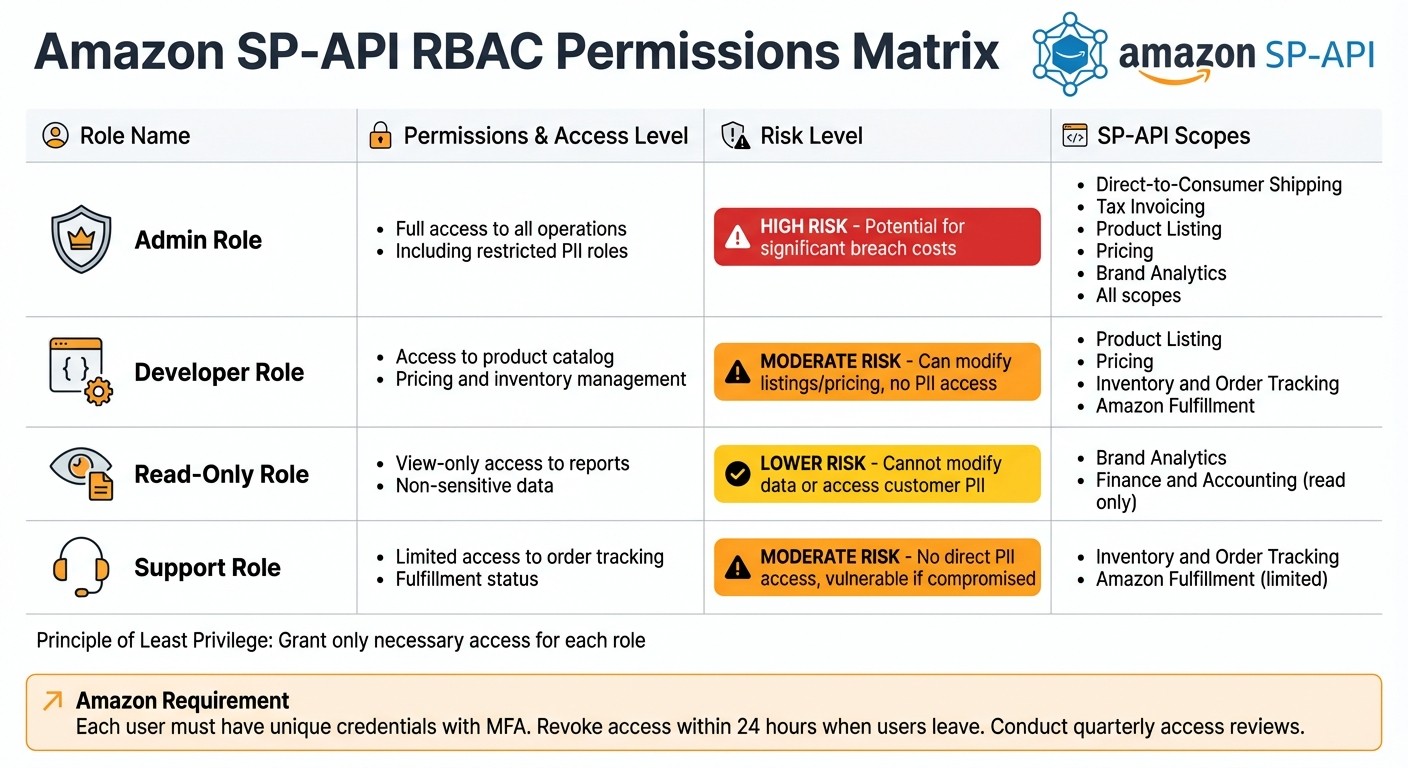
Amazon SP-API RBAC Permissions and Security Roles Comparison
Once you've tightened up token management, the next step is to focus on access control. Role-Based Access Control (RBAC) serves as a vital shield against unauthorized access to sensitive data. Instead of assigning permissions to individual users, RBAC works by granting access based on predefined roles. This simplifies the management of permissions across your organization. For example, Amazon's SP-API uses roles to determine whether a developer or application can perform specific actions or access certain resources. If you attempt to call an operation without the proper role, you'll encounter a 403 Forbidden error.
The foundation of RBAC lies in the principle of least privilege - users and applications should only have the access they absolutely need to perform their tasks. By adhering to this principle, you can significantly limit the damage in the event of a credential compromise. Insider breaches can lead to devastating losses, but by restricting access from the start, you're not only meeting Amazon's Data Protection Policy requirements but also safeguarding your business from potentially severe financial consequences.
Defining User Roles
Start by categorizing team members and applications into roles that align with their responsibilities. For instance, an Admin role might have comprehensive access to all SP-API operations, including restricted ones that involve sensitive information like Personally Identifiable Information (PII). On the other hand, a Read-Only role would only allow viewing non-sensitive data, such as product listings or pricing details.
Amazon organizes SP-API roles into two main groups: Standard and Restricted. Standard roles provide access to non-sensitive data, such as product listings, pricing, and inventory. Restricted roles, however, involve access to PII and require additional security measures before Amazon will grant approval. For example, the Tax Invoicing role allows operations like getOrderBuyerInfo, which retrieves customer names and addresses - data that demands careful handling.
To comply with Amazon's guidelines, avoid using shared or generic credentials. Each individual with access to SP-API information must have a unique ID, as stated in Amazon's Data Protection Policy. Implement unique credentials, enforce multi-factor authentication (MFA), and promptly revoke access - ideally within 24 hours - when users leave the organization. Conduct quarterly access reviews to identify and remove inactive accounts, and set up account lockout mechanisms to detect unusual activity.
Below is a summary table that outlines the roles, permissions, associated risks, and SP-API scopes.
RBAC Permissions Table
Role | Permissions | Risks | SP-API Scopes |
|---|---|---|---|
Admin | Full access to all operations, including restricted PII roles | High risk; potential for significant breach costs | Direct-to-Consumer Shipping, Tax Invoicing, Product Listing, Pricing, Brand Analytics, all scopes |
Developer | Access to product catalog, pricing, and inventory management | Moderate risk; can modify listings and pricing but no PII access | Product Listing, Pricing, Inventory and Order Tracking, Amazon Fulfillment |
Read-Only | View-only access to reports and non-sensitive data | Lower risk; cannot modify data or access customer PII | Brand Analytics, Finance and Accounting (read operations only) |
Support | Limited access to order tracking and fulfillment status | Moderate risk if account is compromised; no direct PII access | Inventory and Order Tracking, Amazon Fulfillment (limited operations) |
Request only the roles necessary for your application's functionality. If you need to add new roles to an existing application, update your developer profile for Amazon's approval. Once approved, apply the role to your application configuration and generate a new refresh token with the updated permissions.
Running Vulnerability Scans and Penetration Tests
After establishing secure access controls and encryption methods, the next critical step in maintaining a secure SP-API integration is conducting vulnerability scans and penetration tests. These practices aren't optional - Amazon's Data Protection Policy requires them. Specifically, you’re expected to run vulnerability scans every 180 days, perform full penetration tests at least once a year, and scan your code for vulnerabilities before releasing any new features. These measures are designed to safeguard both your business and your customers' sensitive information. Let’s break down the methods and tools that can help you meet these requirements.
Regular Vulnerability Scanning
Think of vulnerability scanning as your system's regular health checkup. It helps identify known weaknesses before they can be exploited. Amazon offers two key tools to assist with SP-API integrations: Amazon Selling Partner API Guard and Amazon Inspector.
SP-API Guard: This serverless tool evaluates your AWS data against Amazon’s Data Protection Policy. Within 24 hours, it provides a findings report with actionable recommendations.
Amazon Inspector: This tool works continuously, scanning your EC2 instances for operating system vulnerabilities and unintended network exposure.
For thorough coverage, adopt a multi-layered scanning strategy. Start with Static Application Security Testing (SAST) to analyze your code without running it - this helps catch issues like hardcoded credentials or insecure functions. Follow up with Dynamic Application Security Testing (DAST), which simulates real-world attacks on your live application, and Interactive Application Security Testing (IAST), which checks the functionality of your application in test environments. Developers often supplement these with trusted tools like Nessus, Burp Suite, and OWASP ZAP.
Make sure to perform both external scans (focusing on public-facing elements like ports and websites) and internal scans (to identify gaps within your private network). Together, these methods provide a comprehensive view of your system's security posture.
Penetration Testing Best Practices
While vulnerability scans are great for spotting known issues, penetration testing digs deeper. This hands-on process simulates real-world attacks to uncover complex vulnerabilities that automated tools might miss, such as broken access controls, logic flaws, or advanced injection attacks.
Penetration testing typically follows five structured stages:
Planning: Define the scope and goals of the test.
Scan/Discovery: Conduct reconnaissance to identify potential entry points.
Penetration: Attempt to exploit vulnerabilities using techniques like SQL injection or cross-site scripting.
Analysis/Reporting: Document findings with detailed steps for remediation.
Remediation/Cleanup: Fix the identified issues and re-test to ensure they’re resolved.
The testing approach you choose depends on what you’re trying to simulate. For example:
Black box testing mimics an external attacker with no prior knowledge of your system.
Gray box testing simulates an insider threat with limited access.
White box testing provides testers with full documentation, which speeds up the process.
If your testing involves AWS infrastructure, consult Amazon’s "Penetration Testing guidance" to ensure compliance and avoid disruptions. Always conduct these tests in the SP-API Sandbox environment to prevent any impact on live customer data. And if a security issue arises during testing, you’re required to notify Amazon within 24 hours by emailing security@amazon.com.
Creating Incident Response Procedures
Even with strong security measures in place, breaches can still happen. That’s why Amazon’s Data Protection Policy requires you to have a documented incident response plan. This plan isn’t just a box to check - it’s your guide to minimizing damage when things go wrong. It must be approved by senior management and reviewed every six months to keep up with shifting threats.
Your incident response plan should include six key phases: preparation, identification, containment, eradication, recovery, and lessons learned. To make it actionable, create a runbook that clearly outlines responsibilities and establishes escalation procedures for incidents impacting Amazon services. A critical requirement: you must notify Amazon within 24 hours of any security incident by emailing security@amazon.com.
For effective detection, consider tools like a SIEM or intrusion detection system to monitor logs in real-time. At the very least, review logs bi-weekly. Set up automated alerts to flag unusual activity - such as unexpected request rates, repeated unauthorized API calls, or access to "canary" data records (fake records designed to catch intruders). These detection tools should seamlessly integrate into your broader incident response strategy.
During the recovery phase, your disaster recovery plan needs to include measurable goals: a Recovery Time Objective (RTO), which sets how quickly services must be restored, and a Recovery Point Objective (RPO), which determines acceptable data loss. Use AWS Resilience Hub to analyze applications and establish these targets. Back up your data twice a week, store copies in an offsite location, and encrypt all backups for added security.
To stay ahead of potential threats, conduct an annual risk assessment with senior management. This helps identify vulnerabilities and prioritize responses based on the likelihood and impact of various scenarios. By following this structured and proactive approach, you’ll be ready to respond quickly and effectively, protecting both your business and your customers’ sensitive data.
Conclusion
Keeping your Amazon SP-API integration secure isn't just a best practice - it's essential to avoid disruptions and protect sensitive data. As Amazon's Developer Documentation emphasizes:
"Do not sacrifice security over speed, as it is beneficial to have a robust software development lifecycle that integrates security as a top priority to ensure that a secure product is launched on time."
Failing to prioritize security can have serious consequences. For instance, if Amazon detects compromised credentials, they’ll rotate them automatically, which could lead to days of service downtime.
A strong security framework - covering OAuth 2.0, token management, encryption, RBAC, vulnerability testing, and incident response - creates a solid defense against potential risks. Always follow best practices for credential management to meet Amazon's high standards and maintain uninterrupted service.
FAQs
How does OAuth 2.0 enhance security for Amazon SP-API integrations?
OAuth 2.0 improves the security of Amazon SP-API integrations by enabling sellers to provide limited and revocable access to third-party apps through Login with Amazon. Instead of requiring sensitive seller credentials to be stored, applications rely on short-lived access tokens that are securely generated using refresh tokens.
This method minimizes the chances of credential exposure and ensures that access is controlled through tokens, aligning with Amazon's stringent security requirements for safer integrations.
What are the best practices for securely storing and managing Amazon SP-API tokens?
To ensure your Amazon SP-API tokens stay secure and meet compliance standards, follow these key practices:
Use a secure secret manager: Instead of hard-coding tokens or storing them in source code, rely on services like AWS Secrets Manager. These tools encrypt your tokens both when stored and during transmission, keeping them safe from unauthorized access.
Rotate tokens regularly: Set up automated processes to rotate long-term credentials. Whenever possible, opt for short-lived tokens to reduce the risk of exposure.
Restrict access: Apply the principle of least privilege. Only grant the minimal permissions required to access and use tokens.
Avoid embedding credentials: Do not hard-code tokens, client IDs, or secrets into your source code. Use environment variables or runtime secret injection methods to handle credentials securely.
Monitor and audit: Activate logging and establish alerts for unusual access patterns or activities. This helps you quickly identify and mitigate potential security breaches.
These steps not only safeguard sensitive data but also help you stay aligned with Amazon’s security guidelines, ensuring your SP-API integrations remain secure and dependable.
Why is role-based access control important for securing Amazon SP-API integrations?
Role-based access control (RBAC) plays a key role in safeguarding Amazon SP-API integrations. It ensures that users and applications have access only to the data and operations they genuinely need, reducing the chances of unauthorized access to sensitive information like personal data. This approach aligns with the principle of least privilege, a cornerstone of secure system design.
With roles that come with well-defined permissions, businesses can add an extra layer of protection to their SP-API integrations. This not only helps prevent misuse or accidental errors but also supports adherence to critical security and privacy standards.






