


E-Commerce Strategies
Amazon PPC budgets can drain fast, leaving you with wasted spend if you’re not tracking in real time. Relying on end-of-day reports often means catching issues too late, especially for sellers spending $500–$2,000 daily. Real-time budget tracking helps you monitor spend, sales, and ACoS instantly, so you can stop underperforming campaigns and scale profitable ones during peak shopping periods.
Key Takeaways:
Why Real-Time Tracking Matters: Avoid overspending or campaigns going offline midday. Manual checks often miss problems for 2–5 days, costing $650–$1,600 per incident for $10,000/month accounts.
Metrics to Watch: Spend, ACoS, ROAS, impressions, clicks, and TACoS. These metrics help you catch overspending and adjust campaigns quickly.
Tools to Use: Amazon Advertising Console (hourly updates), Amazon Marketing Stream (near real-time data), and third-party tools like Optmyzr or Helium 10 for automation and alerts.
Automation Benefits: Save 8–10 hours weekly with alerts and automated adjustments for bids and budgets.
Expert Help: Agencies like eStore Factory can manage real-time tracking, saving time and reducing wasted spend.
Real-time tracking ensures your ad dollars are spent wisely, especially during high-stakes events like Prime Day or Black Friday. With the right tools and strategies, you can protect your margins and improve campaign performance.
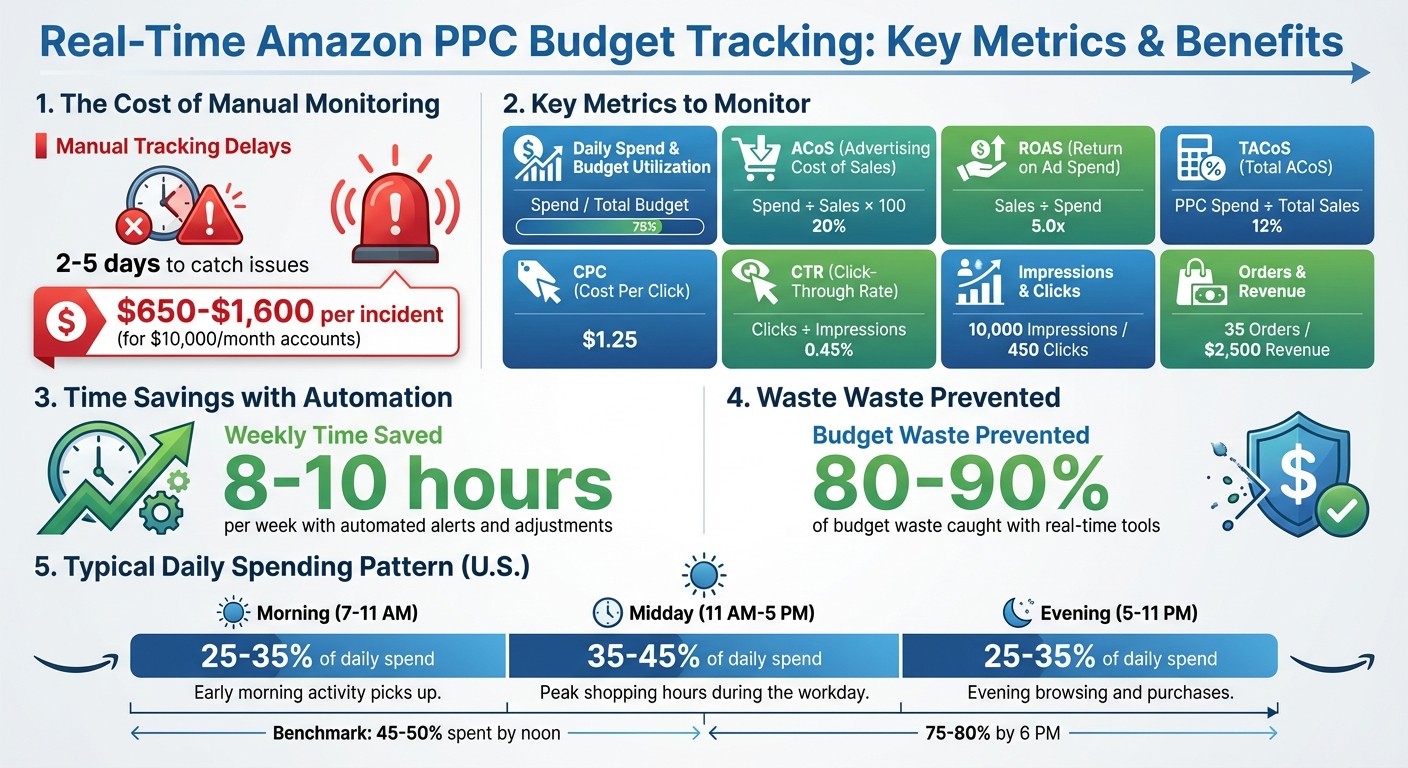
Real-Time Amazon PPC Budget Tracking: Key Metrics and Time Savings
Metrics and Tools for Real-Time Budget Tracking
Key Metrics for PPC Budget Management
Focusing on the right metrics can mean the difference between catching issues early or dealing with them after they’ve already eaten into your profits. Daily spend and budget utilization are crucial for monitoring pacing - if you’ve burned through 50% of your budget by noon, you risk running out before evening traffic peaks.
Metrics like impressions and clicks help gauge ad visibility and engagement, while CPC (cost per click) measures how much each interaction costs on average. CTR (click-through rate, calculated as clicks divided by impressions) reflects ad relevance - a CTR under 1% might indicate your targeting or ad creative needs work. On the sales side, orders and revenue track the direct results of your ads, while ACoS (advertising cost of sales: spend divided by sales × 100) measures profitability, and ROAS (return on ad spend: sales divided by spend) highlights your return on investment. For a broader perspective, TACoS (total ACoS: PPC spend divided by total sales) ties ad spend to overall revenue, including organic sales, offering a clearer picture of long-term efficiency.
These metrics empower quick decisions. For example, if your ACoS jumps to 45% when your goal is 30%, you can pause underperforming keywords. Similarly, if your daily spend hits 120% of the target by mid-afternoon, you can adjust your budget to avoid overspending for the month.
Amazon’s Tools for Real-Time Tracking
Once you have your metrics in place, Amazon’s built-in tools provide near real-time updates to keep you in control. The Amazon Advertising Console updates within hours and displays key metrics like daily spend, impressions, clicks, CPC, CTR, orders, sales, ACoS, and ROAS for all campaigns. This tool lets you spot patterns throughout the day. For instance, if your morning CPC spikes to $1.50 from an average of $0.80, you can lower bids or pause campaigns. It also breaks down performance by placement (e.g., top-of-search vs. product pages) and device type, giving you more control over where your budget is going.
For even faster insights, Amazon Marketing Stream provides hourly or quicker updates on metrics like impressions, clicks, attributed sales, and spend. This data integrates directly with tools like Google Data Studio, allowing you to create custom dashboards that auto-refresh and flag issues. For example, if your spend hits 80–120% of your daily target during a high-stakes event like Prime Day, you’ll know immediately. Meanwhile, the Amazon Ads API offers programmatic access to data refreshed every 1–2 hours, including daily budgets, spend, and ACoS. You can even set up automated alerts - for example, when budget utilization hits 90% mid-day or TACoS exceeds 15% - to make adjustments without logging into the console.
These tools provide a solid foundation for real-time tracking, but third-party platforms can take your monitoring and automation to the next level.
Third-Party Tools for Enhanced Tracking
While Amazon’s tools are robust, third-party platforms offer added automation, alerts, and cross-account insights that save time and effort. Optmyzr ($299/month) features a PPC Investigator tool that diagnoses spend problems and applies hourly bid rules. For instance, it can automatically increase budgets by 15% when ACoS stays below 20%. Helium 10 ($39–$279/month) includes inventory-linked ad pausing, ensuring ads stop running when products go out of stock. Other tools like Nova, Advigator Analytics, and Pacr provide real-time dashboards and budget pacing alerts to catch overspending before it spirals out of control.
These platforms excel at automation and proactive monitoring. Optmyzr, for example, can alert you if you overspend by 20%, potentially cutting waste by up to 90% compared to manual tracking. Agencies using Pacr’s ad spend tracker have reported saving around 8 hours a week on budget tasks, while Adalysis users claim to save up to 10 hours weekly thanks to automated pacing tools. These time savings, combined with reduced budget overruns, often make these tools worth the investment.
How to Set Up Real-Time Budget Monitoring
Configure Amazon Campaign Manager for Budget Tracking
Start by organizing your campaigns into portfolios to simplify budget management. In the Amazon Advertising Console, head to the "Portfolios" tab and click "Create portfolio." Select the campaigns you want to group by checking their boxes, then assign them a shared daily budget. This approach allows you to track total spending across multiple campaigns in one place, with pacing views that show how much of your budget is being utilized in real time.
To make monitoring more effective, customize your campaign view to include budget-specific data. In the Campaigns section, open the "Columns" dropdown and add fields like "Daily budget", "Spend", "Budget utilization", and "Impressions." Switch to the "Pacing" view to see graphical trends, hourly activity patterns, and end-of-day spending projections. If your pacing shows you're on track to overspend, you can quickly adjust bids or reallocate budgets. For even more efficiency, consider integrating real-time data feeds into your system.
Set Up Amazon Marketing Stream
For hourly updates on your pay-per-click (PPC) metrics, activate Amazon Marketing Stream. Use a Seller Central or Vendor Central account with developer access. Navigate to "Apps & Services" > "Amazon Marketing Stream" in Seller Central, click "Subscribe", and choose hourly feeds for metrics like spend, impressions, and clicks. Provide an Amazon S3 bucket or another compatible endpoint to receive the data. Once set up, the system will deliver hourly updates for near-real-time tracking.
After enabling the stream, route the data to Amazon S3. From there, you can use AWS Athena for querying or integrate the data into tools like Google Data Studio for analysis. Set up queries to identify potential issues early - if your spend is approaching the daily limit too quickly, alerts can notify you to adjust bids or pause campaigns before exceeding your budget.
Create a Real-Time Dashboard
With live data flowing in, you can easily visualize your metrics using a custom dashboard. Tools like Google Sheets or Data Studio can pull hourly metrics directly from the Amazon Advertising API. Use formulas like =Spend/DailyBudget*100 to calculate pacing percentages, set up charts to track trends, and apply conditional formatting to highlight utilization rates above 120%. Automated alerts can be configured to catch problems within hours, which is crucial since manual monitoring often misses issues for 2–5 days. This delay could cost a $10,000/month account anywhere from $650 to $1,600 per incident in wasted spend.
Control Budgets with Real-Time Data and Alerts
Configure Alerts for Budget Issues
Set up alerts to catch budget risks as they happen. The best alerts combine ratio metrics and spending thresholds, ensuring you’re only notified when actual dollars are at stake. For instance, you might create an alert that triggers if your ACoS goes over 35% and daily spend exceeds $100 on a campaign. This way, you avoid unnecessary alerts caused by minor fluctuations in low-spend campaigns.
Here are some useful alert conditions to consider:
Notify if cumulative spend by noon surpasses 60–70% of your daily budget, signaling potential over-pacing.
Trigger an alert if ACoS rises 20–30% above your break-even point for two to three consecutive hours.
Flag when CPC increases by 20–30% compared to the trailing 7-day average for that specific time of day.
Set up alerts for ROAS dropping below 3.0 for three straight hours when daily spend exceeds $150.
Highlight keywords that spend over $30 in a day without generating any orders.
Third-party PPC platforms that integrate with Amazon’s API can send email, SMS, or push notifications when your thresholds are breached. Make sure your alert settings align with U.S. peak shopping hours - typically 7:00 a.m. to 11:00 p.m. - and use intraday spending data to fine-tune your adjustments.
Track Intraday Spending Patterns
Create a target spending curve based on when your customers are most likely to convert. Use data from Amazon Marketing Stream or your reporting tools to export hourly performance metrics from the past 2–4 weeks. Analyze the share of daily spend, clicks, orders, and sales for each hour to pinpoint your peak conversion periods.
For many U.S. consumer products, spending often follows this pattern:
Morning ramp (7:00–11:00 a.m.): 25–35% of daily spend as shoppers browse.
Midday plateau (11:00 a.m.–5:00 p.m.): 35–45% of daily spend.
Evening peak (5:00–11:00 p.m.): 25–35% of daily spend as people finalize purchases after work.
Your target curve might show around 45–50% of your budget spent by noon and 75–80% by 6:00 p.m., but adjust it based on your category’s specific trends.
When actual spending veers off this curve, it’s time to make changes. If 70% of your budget is gone by 1:00 p.m. instead of the target 50%, consider cutting bids by 10–20% on high-CPC terms and trimming non-essential campaign budgets. On the flip side, if you're lagging behind your spending pace, increase bids by 10–25% on top-performing keywords with low ACoS and strong conversion rates, or raise daily budgets on high-ROAS campaigns to ensure they stay active during the evening rush. Use these patterns to guide automated budget adjustments for smoother control.
Automate Budget Adjustments with Rules
Once you’ve set up alerts and identified spending trends, take it a step further by automating budget adjustments. Amazon’s Budget Rules allow you to automate changes based on timing or performance metrics:
Schedule-based rules are ideal for predictable patterns:
Increase daily budgets by 30% every Friday through Sunday from 6:00–11:00 p.m. Eastern during Q4 to capture weekend traffic.
Performance-based rules respond to real-time campaign metrics:
Raise the budget by 25% if ACoS stays below 20% over the past seven days.
Boost the budget by 20% if the conversion rate exceeds 5% and spend is under $100 by 3:00 p.m.
For even more control, third-party platforms offer bid automation:
Increase bids by 10–15% for keywords with at least 10 clicks, ACoS below 70% of your target, and two or more orders in the past three days.
Lower bids by 25% if a keyword spends over $40 in two days without orders, and pause it if the trend continues.
Start with small adjustments - around 10–20% - and limit how often rules are applied to prevent erratic swings that could disrupt your campaigns. This measured approach helps you maintain stability while optimizing performance.
Work with Experts for Real-Time PPC Management
How eStore Factory Helps with PPC Budget Tracking
If you're looking to take control of your PPC campaigns in real time, eStore Factory provides expert, hands-on management that makes all the difference. Managing PPC effectively requires constant vigilance - keeping an eye on spending, tweaking bids, and addressing budget problems before they spiral out of control. With a team of over 70 Amazon specialists, eStore Factory handles these tasks seamlessly. They use automated alerts, custom dashboards, and continuous campaign optimization to ensure your budget works smarter, not harder. With over a decade of experience and more than $250 million in client sales, they know how to cut waste and boost profitability.
The team integrates Amazon Marketing Stream to pull hourly performance data and create dashboards that track critical metrics like cumulative spend, daily budgets, ACoS trends, CPC changes, and hourly conversion rates. These dashboards provide a clear, U.S.-formatted breakdown of every dollar spent in real time. Plus, eStore Factory sets up tiered alerts to notify you at 70%, 90%, and 100% of your daily budget - or when ACoS exceeds your target. This ensures any issues are flagged and addressed within hours, not days.
But it doesn’t stop at monitoring. The agency uses automated performance-based adjustments to fine-tune bids and budgets in real time. For instance, they lower bids on high-ACoS keywords, increase budgets for high-ROAS campaigns during peak U.S. shopping hours (typically 7:00 a.m. to 11:00 p.m. Eastern), and pause ads for out-of-stock products. This inventory-aware approach prevents wasted ad spend, a common pitfall with manual management. These precise, data-driven adjustments lead to better results and improved efficiency when you outsource your PPC management.
Benefits of Outsourcing PPC Management
Handing over your PPC management to experts doesn’t just save time - it also sharpens your overall strategy. Agencies like eStore Factory can save you 8–10 hours per week by taking over time-consuming tasks like campaign monitoring, reporting, and manual optimizations. That’s extra time you can dedicate to sourcing new products, streamlining operations, or breaking into new marketplaces. Instead of constantly checking campaigns and scrambling to fix budget overruns, you can rely on professionals to handle optimization while you focus on growth.
Expert oversight also minimizes costly mistakes. Real-time tools and experienced management catch 80–90% of budget waste caused by issues like CPC spikes, conversion drops, or pacing problems before they turn into major losses. eStore Factory’s award-winning team - recognized with three Amazon SPN Awards - aligns your PPC strategy with your broader business goals. They also adjust campaigns for U.S. seasonality, whether it’s Prime Day, Black Friday, Cyber Monday, or the Q4 holiday rush. If your monthly ad spend hits $5,000–$10,000 or you’re managing multiple brands and marketplaces, partnering with specialists ensures your campaigns run smoothly without the stress of constant manual oversight.
How to Set a PPC Budget Cap | Don't Overspend on Amazon Ads
Conclusion
Keeping a close eye on your PPC budget in real-time is crucial to safeguarding your ad spend and getting the most out of your Amazon campaigns. Relying solely on manual monitoring can leave gaps, with delays of 2–5 days potentially leading to losses of $650–$1,600 per incident for accounts spending $10,000 a month. Automated tools, on the other hand, can catch issues within hours, helping to prevent 80–90% of wasted budget caused by CPC spikes, drops in conversions, or pacing problems.
To take control of your budget, start by setting up budget pacing alerts - for instance, flagging when daily spend goes over 120% or falls below 80% of your target. Use dashboards to keep tabs on critical metrics like ACoS, cumulative spend, and hourly conversion rates. Automation can also make a huge difference, enabling you to adjust bids, pause ads that aren’t performing, and scale budgets during peak times - all while cutting manual monitoring time by as much as 50%.
For a smoother process, consider partnering with professionals who specialize in Amazon PPC. Agencies like eStore Factory handle automated alerts, create custom dashboards, and manage ongoing optimizations, freeing you up to focus on sourcing products and growing your business. With the right tools and expert help, you can avoid costly errors, stay ahead of the competition, and set the stage for long-term success.
FAQs
How does real-time tracking help control your Amazon PPC budget?
Real-time tracking puts you in the driver’s seat when it comes to managing your Amazon PPC budget. With up-to-the-minute updates on your ad spend, you can make swift adjustments to campaigns and avoid blowing past your budget.
By keeping a close eye on performance, you can spot overspending patterns early, shift funds toward ads that are delivering results, and get the most bang for your buck. Using real-time data keeps your campaigns sharp, efficient, and on track financially.
What metrics should I track to manage my Amazon PPC budget effectively?
To get the most out of your Amazon PPC budget, it's essential to keep an eye on a few important metrics that reveal how well your campaigns are performing. Here's what to focus on:
Cost Per Click (CPC): This tells you the average cost you incur every time someone clicks on your ad. Keeping this in check helps manage spending efficiently.
Advertising Cost of Sales (ACoS): This percentage shows how much you're spending on ads compared to the revenue they generate. A lower ACoS typically means better profitability.
Return on Ad Spend (ROAS): This metric shows how much revenue you’re earning for each dollar spent on advertising. The higher the ROAS, the better your campaign is performing.
Click-Through Rate (CTR): This is the percentage of people who click on your ad after seeing it. A high CTR often indicates that your ad is appealing and relevant to your audience.
Impressions: This measures how often your ad appears in front of potential customers. More impressions mean greater visibility, but they should translate into clicks and sales.
By keeping tabs on these metrics, you’ll be able to spot areas for improvement, manage your budget wisely, and ensure your campaigns deliver the best possible results.
What are the best tools for tracking and automating your Amazon PPC budget in real time?
To stay on top of your Amazon PPC budget and manage it effectively in real time, consider leveraging advanced PPC management tools and campaign optimization platforms. These tools offer real-time data on your ad spend, performance metrics, and budget allocation, allowing you to make informed decisions and prevent overspending.
Prioritize tools that include features like automated alerts, intuitive spend tracking dashboards, and detailed performance analytics. These capabilities not only save you time but also help improve the efficiency of your advertising campaigns, keeping them within budget while aiming for maximum ROI.






