

Back to Page
Amazon Fee
No More Amazon Fee Confusion in 2026: How Sellers Can Decode Charges and Save Money
No More Amazon Fee Confusion in 2026: How Sellers Can Decode Charges and Save Money
Back to Page
Amazon Fee
No More Amazon Fee Confusion in 2026: How Sellers Can Decode Charges and Save Money
TL;DR
Amazon’s Fee Explainer Tool offers clear, itemized breakdowns of all fees, including subscription, referral, and return fees.
The tool provides transparency, showing you exactly why each fee is applied, how it’s calculated, and what factors influence it.
It helps sellers accurately track costs and calculate true profit margins, eliminating guesswork.
By understanding your fees in detail, you can make smarter business decisions, adjust prices, and improve profitability.
The tool saves time by reducing the need for manual calculations or deep dives into help pages, making fee management more efficient.
With full visibility into your charges, you can avoid unexpected fees and forecast your expenses confidently.
Ever felt like Amazon fees are a secret code you just can’t crack? With various charges like subscription fees, referral fees, and closing fees, it often feels like piecing together a puzzle that never quite fits. Here’s the positive shift ahead: 2026 is just around the corner. Amazon has just rolled out a game-changing solution: the Fee Explainer Tool.
Picture this: a seller of handmade candles spent hours every month trying to decipher fees, unsure why profits weren’t adding up. Like many sellers, there was constant guesswork around which charges applied to each product.
Now, with Amazon’s new tool, sellers get a clear, itemized breakdown that makes fee tracking simple. No more second-guessing. Sellers can finally take control and understand exactly what they’re being charged and why. It’s time to decode those fees and start saving.
What is the Fee Explainer tool?
Think of the Fee Explainer tool as Amazon’s ‘fee transparency lens.’ It’s like a backstage pass that lets you see exactly what’s happening behind the curtain of those charges. No more confusion about why certain fees are applied or how they impact your profits.
This tool breaks down the entire fee structure, providing a comprehensive view of every charge, from subscription fees to customer return fees. Here's how it works:
Subscription Fees: These are your monthly fees to sell on Amazon. The Fee Explainer shows exactly how these fees are calculated based on your account type.
Referral Fees: A percentage Amazon takes for facilitating a sale. The tool helps you understand how product categories affect the fee rate.
Closing Fees: These are the fixed costs for each sale, like shipping and handling. The Fee Explainer shows the breakdown of how these are charged.
Refund Administration Fees: When customers return items, this fee covers the processing costs.
Customer Return Fees: If your product has a high return rate, this fee ensures the cost of handling returns.
The Fee Explainer goes beyond just showing the fee; it provides a clear, detailed explanation of why each fee is applied, what factors influence the charge, and how it's calculated. It's like having a personal guide through Amazon’s fee maze.
How does the Fee Explainer tool work?

Each Fee Explainer provides information in three easy-to-understand sections:
Fee definition
Clear explanation of what the fee is
Why does the fee apply to your transaction
Fee attributes
Specific factors that determine the fee
Relevant product or service characteristics
Fee calculation
Transparent breakdown of how the fee is computed
Clear example of calculations when applicable
3 ways the Fee Explainer boosts your bottom line
Ever wondered why your margins seem tighter than expected? Or where are all those extra charges creeping in from? If you're tired of guessing why your profits aren't adding up, the Fee Explainer Tool is here to be your new best friend.
For years, sellers have struggled with the complexity of Amazon’s fees, tracking them, understanding them, and trying to figure out where every penny goes. The Fee Explainer changes all that. Now, instead of getting a vague total, you get a clear breakdown of each fee. This transparency allows you to take control of your business in a way you never could before.
By breaking down every fee clearly, Amazon has given you the clarity and control you need to boost your profits and focus on what truly matters.
#1 Pinpoint accuracy in cost tracking
As a seller, one of the biggest challenges is calculating your true profit margins. With fluctuating sourcing and shipping costs, it's easy to miscalculate. The Fee Explainer Tool changes that by giving you accurate, item-level profit/loss analysis.
Instead of relying on rough estimates, you now have a precise breakdown of every fee associated with your product, helping you assess exactly where you’re making or losing money. This allows you to make smarter decisions when sourcing products, adjusting prices, and managing your expenses. No more guessing, just clear insights to keep your margins healthy.
#2 The power of transparency
Ever been hit with unexpected Amazon charges and wondered where they came from? It’s frustrating and can eat into your profits. With the Fee Explainer, you now have full visibility into why each charge appears. Whether it’s a referral fee, a return processing fee, or a subscription charge, the tool breaks it all down for you.
By understanding exactly why a fee is applied, you can forecast your expenses more confidently and avoid any end-of-month surprises that could affect your bottom line. Transparency gives you control, which means fewer shocks to your cash flow.
#3 Save time, reduce frustration
Time spent trying to track down charges and reconcile accounts is time you’re not spending growing your business. The Fee Explainer Tool eliminates the need for manual calculations or deep dives into Amazon’s help pages.
With just a click, you can view all your fees in one easy-to-understand report. This means less time spent on administrative tasks and more time focusing on your business. It’s an efficiency boost that translates directly to more productive hours and less frustration.
Step-by-step action plan: How to access and use the tool today
Accessing and using the Amazon Fee Explainer Tool is quick and easy, and here’s how you can get started:
1. Navigate
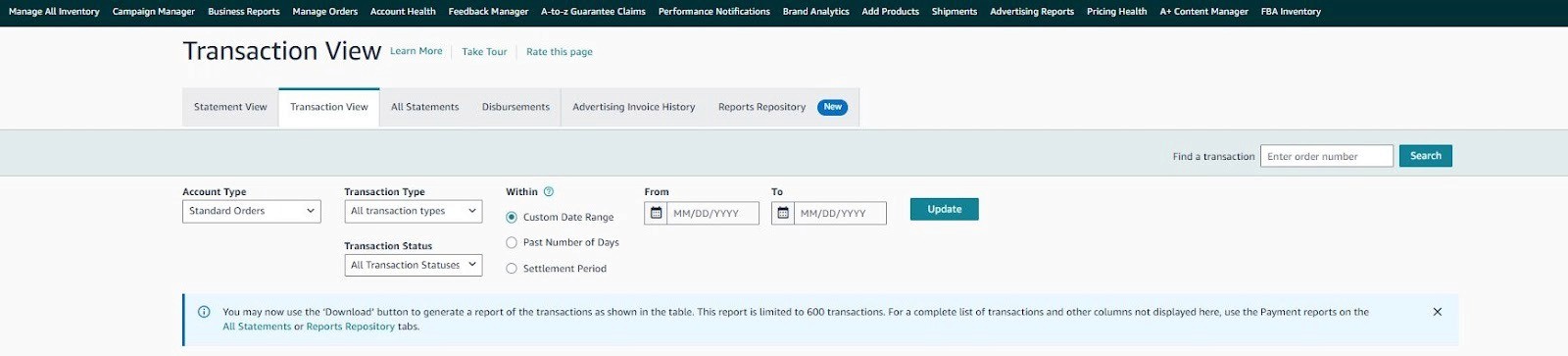
First, head to your Payments Dashboard in Seller Central. From there, select the "Transaction View" page, where you can see a full list of your transactions.
2. Locate
Scroll through your transactions to find the one you want to audit. Whether it’s a recent sale or a charge you’re curious about, simply click on the transaction to view more details.
3. Click
Once you’ve selected your transaction, click the fee amount link next to the charge you want to explore. This will open up a detailed breakdown of the fee, showing you the definition, factors, and calculation of that charge.
With this simple process, you can instantly access a detailed explanation of any fee, empowering you to make informed decisions and take control of your costs.
Final thoughts
2026 is the year of clarity for Amazon sellers. The Fee Explainer Tool is a game-changer, putting you in control of your costs and helping you track your profitability like never before. No more surprises and just transparency that empowers you to make smarter decisions and grow your business with confidence. It’s time to stop worrying about hidden fees and start focusing on what matters most: your profits.
Want to make the most of this tool?
Our Amazon consultants are here to guide you through pricing strategies, cost management, and more to ensure you’re maximizing your profits. Reach out today, and let’s unlock the full potential of your business together.
TL;DR
Amazon’s Fee Explainer Tool offers clear, itemized breakdowns of all fees, including subscription, referral, and return fees.
The tool provides transparency, showing you exactly why each fee is applied, how it’s calculated, and what factors influence it.
It helps sellers accurately track costs and calculate true profit margins, eliminating guesswork.
By understanding your fees in detail, you can make smarter business decisions, adjust prices, and improve profitability.
The tool saves time by reducing the need for manual calculations or deep dives into help pages, making fee management more efficient.
With full visibility into your charges, you can avoid unexpected fees and forecast your expenses confidently.
Ever felt like Amazon fees are a secret code you just can’t crack? With various charges like subscription fees, referral fees, and closing fees, it often feels like piecing together a puzzle that never quite fits. Here’s the positive shift ahead: 2026 is just around the corner. Amazon has just rolled out a game-changing solution: the Fee Explainer Tool.
Picture this: a seller of handmade candles spent hours every month trying to decipher fees, unsure why profits weren’t adding up. Like many sellers, there was constant guesswork around which charges applied to each product.
Now, with Amazon’s new tool, sellers get a clear, itemized breakdown that makes fee tracking simple. No more second-guessing. Sellers can finally take control and understand exactly what they’re being charged and why. It’s time to decode those fees and start saving.
What is the Fee Explainer tool?
Think of the Fee Explainer tool as Amazon’s ‘fee transparency lens.’ It’s like a backstage pass that lets you see exactly what’s happening behind the curtain of those charges. No more confusion about why certain fees are applied or how they impact your profits.
This tool breaks down the entire fee structure, providing a comprehensive view of every charge, from subscription fees to customer return fees. Here's how it works:
Subscription Fees: These are your monthly fees to sell on Amazon. The Fee Explainer shows exactly how these fees are calculated based on your account type.
Referral Fees: A percentage Amazon takes for facilitating a sale. The tool helps you understand how product categories affect the fee rate.
Closing Fees: These are the fixed costs for each sale, like shipping and handling. The Fee Explainer shows the breakdown of how these are charged.
Refund Administration Fees: When customers return items, this fee covers the processing costs.
Customer Return Fees: If your product has a high return rate, this fee ensures the cost of handling returns.
The Fee Explainer goes beyond just showing the fee; it provides a clear, detailed explanation of why each fee is applied, what factors influence the charge, and how it's calculated. It's like having a personal guide through Amazon’s fee maze.
How does the Fee Explainer tool work?
Each Fee Explainer provides information in three easy-to-understand sections:
Fee definition
Clear explanation of what the fee is
Why does the fee apply to your transaction
Fee attributes
Specific factors that determine the fee
Relevant product or service characteristics
Fee calculation
Transparent breakdown of how the fee is computed
Clear example of calculations when applicable
3 ways the Fee Explainer boosts your bottom line
Ever wondered why your margins seem tighter than expected? Or where are all those extra charges creeping in from? If you're tired of guessing why your profits aren't adding up, the Fee Explainer Tool is here to be your new best friend.
For years, sellers have struggled with the complexity of Amazon’s fees, tracking them, understanding them, and trying to figure out where every penny goes. The Fee Explainer changes all that. Now, instead of getting a vague total, you get a clear breakdown of each fee. This transparency allows you to take control of your business in a way you never could before.
By breaking down every fee clearly, Amazon has given you the clarity and control you need to boost your profits and focus on what truly matters.
#1 Pinpoint accuracy in cost tracking
As a seller, one of the biggest challenges is calculating your true profit margins. With fluctuating sourcing and shipping costs, it's easy to miscalculate. The Fee Explainer Tool changes that by giving you accurate, item-level profit/loss analysis.
Instead of relying on rough estimates, you now have a precise breakdown of every fee associated with your product, helping you assess exactly where you’re making or losing money. This allows you to make smarter decisions when sourcing products, adjusting prices, and managing your expenses. No more guessing, just clear insights to keep your margins healthy.
#2 The power of transparency
Ever been hit with unexpected Amazon charges and wondered where they came from? It’s frustrating and can eat into your profits. With the Fee Explainer, you now have full visibility into why each charge appears. Whether it’s a referral fee, a return processing fee, or a subscription charge, the tool breaks it all down for you.
By understanding exactly why a fee is applied, you can forecast your expenses more confidently and avoid any end-of-month surprises that could affect your bottom line. Transparency gives you control, which means fewer shocks to your cash flow.
#3 Save time, reduce frustration
Time spent trying to track down charges and reconcile accounts is time you’re not spending growing your business. The Fee Explainer Tool eliminates the need for manual calculations or deep dives into Amazon’s help pages.
With just a click, you can view all your fees in one easy-to-understand report. This means less time spent on administrative tasks and more time focusing on your business. It’s an efficiency boost that translates directly to more productive hours and less frustration.
Step-by-step action plan: How to access and use the tool today
Accessing and using the Amazon Fee Explainer Tool is quick and easy, and here’s how you can get started:
1. Navigate
First, head to your Payments Dashboard in Seller Central. From there, select the "Transaction View" page, where you can see a full list of your transactions.
2. Locate
Scroll through your transactions to find the one you want to audit. Whether it’s a recent sale or a charge you’re curious about, simply click on the transaction to view more details.
3. Click
Once you’ve selected your transaction, click the fee amount link next to the charge you want to explore. This will open up a detailed breakdown of the fee, showing you the definition, factors, and calculation of that charge.
With this simple process, you can instantly access a detailed explanation of any fee, empowering you to make informed decisions and take control of your costs.
Final thoughts
2026 is the year of clarity for Amazon sellers. The Fee Explainer Tool is a game-changer, putting you in control of your costs and helping you track your profitability like never before. No more surprises and just transparency that empowers you to make smarter decisions and grow your business with confidence. It’s time to stop worrying about hidden fees and start focusing on what matters most: your profits.
Want to make the most of this tool?
Our Amazon consultants are here to guide you through pricing strategies, cost management, and more to ensure you’re maximizing your profits. Reach out today, and let’s unlock the full potential of your business together.
TL;DR
Amazon’s Fee Explainer Tool offers clear, itemized breakdowns of all fees, including subscription, referral, and return fees.
The tool provides transparency, showing you exactly why each fee is applied, how it’s calculated, and what factors influence it.
It helps sellers accurately track costs and calculate true profit margins, eliminating guesswork.
By understanding your fees in detail, you can make smarter business decisions, adjust prices, and improve profitability.
The tool saves time by reducing the need for manual calculations or deep dives into help pages, making fee management more efficient.
With full visibility into your charges, you can avoid unexpected fees and forecast your expenses confidently.
Ever felt like Amazon fees are a secret code you just can’t crack? With various charges like subscription fees, referral fees, and closing fees, it often feels like piecing together a puzzle that never quite fits. Here’s the positive shift ahead: 2026 is just around the corner. Amazon has just rolled out a game-changing solution: the Fee Explainer Tool.
Picture this: a seller of handmade candles spent hours every month trying to decipher fees, unsure why profits weren’t adding up. Like many sellers, there was constant guesswork around which charges applied to each product.
Now, with Amazon’s new tool, sellers get a clear, itemized breakdown that makes fee tracking simple. No more second-guessing. Sellers can finally take control and understand exactly what they’re being charged and why. It’s time to decode those fees and start saving.
What is the Fee Explainer tool?
Think of the Fee Explainer tool as Amazon’s ‘fee transparency lens.’ It’s like a backstage pass that lets you see exactly what’s happening behind the curtain of those charges. No more confusion about why certain fees are applied or how they impact your profits.
This tool breaks down the entire fee structure, providing a comprehensive view of every charge, from subscription fees to customer return fees. Here's how it works:
Subscription Fees: These are your monthly fees to sell on Amazon. The Fee Explainer shows exactly how these fees are calculated based on your account type.
Referral Fees: A percentage Amazon takes for facilitating a sale. The tool helps you understand how product categories affect the fee rate.
Closing Fees: These are the fixed costs for each sale, like shipping and handling. The Fee Explainer shows the breakdown of how these are charged.
Refund Administration Fees: When customers return items, this fee covers the processing costs.
Customer Return Fees: If your product has a high return rate, this fee ensures the cost of handling returns.
The Fee Explainer goes beyond just showing the fee; it provides a clear, detailed explanation of why each fee is applied, what factors influence the charge, and how it's calculated. It's like having a personal guide through Amazon’s fee maze.
How does the Fee Explainer tool work?
Each Fee Explainer provides information in three easy-to-understand sections:
Fee definition
Clear explanation of what the fee is
Why does the fee apply to your transaction
Fee attributes
Specific factors that determine the fee
Relevant product or service characteristics
Fee calculation
Transparent breakdown of how the fee is computed
Clear example of calculations when applicable
3 ways the Fee Explainer boosts your bottom line
Ever wondered why your margins seem tighter than expected? Or where are all those extra charges creeping in from? If you're tired of guessing why your profits aren't adding up, the Fee Explainer Tool is here to be your new best friend.
For years, sellers have struggled with the complexity of Amazon’s fees, tracking them, understanding them, and trying to figure out where every penny goes. The Fee Explainer changes all that. Now, instead of getting a vague total, you get a clear breakdown of each fee. This transparency allows you to take control of your business in a way you never could before.
By breaking down every fee clearly, Amazon has given you the clarity and control you need to boost your profits and focus on what truly matters.
#1 Pinpoint accuracy in cost tracking
As a seller, one of the biggest challenges is calculating your true profit margins. With fluctuating sourcing and shipping costs, it's easy to miscalculate. The Fee Explainer Tool changes that by giving you accurate, item-level profit/loss analysis.
Instead of relying on rough estimates, you now have a precise breakdown of every fee associated with your product, helping you assess exactly where you’re making or losing money. This allows you to make smarter decisions when sourcing products, adjusting prices, and managing your expenses. No more guessing, just clear insights to keep your margins healthy.
#2 The power of transparency
Ever been hit with unexpected Amazon charges and wondered where they came from? It’s frustrating and can eat into your profits. With the Fee Explainer, you now have full visibility into why each charge appears. Whether it’s a referral fee, a return processing fee, or a subscription charge, the tool breaks it all down for you.
By understanding exactly why a fee is applied, you can forecast your expenses more confidently and avoid any end-of-month surprises that could affect your bottom line. Transparency gives you control, which means fewer shocks to your cash flow.
#3 Save time, reduce frustration
Time spent trying to track down charges and reconcile accounts is time you’re not spending growing your business. The Fee Explainer Tool eliminates the need for manual calculations or deep dives into Amazon’s help pages.
With just a click, you can view all your fees in one easy-to-understand report. This means less time spent on administrative tasks and more time focusing on your business. It’s an efficiency boost that translates directly to more productive hours and less frustration.
Step-by-step action plan: How to access and use the tool today
Accessing and using the Amazon Fee Explainer Tool is quick and easy, and here’s how you can get started:
1. Navigate
First, head to your Payments Dashboard in Seller Central. From there, select the "Transaction View" page, where you can see a full list of your transactions.
2. Locate
Scroll through your transactions to find the one you want to audit. Whether it’s a recent sale or a charge you’re curious about, simply click on the transaction to view more details.
3. Click
Once you’ve selected your transaction, click the fee amount link next to the charge you want to explore. This will open up a detailed breakdown of the fee, showing you the definition, factors, and calculation of that charge.
With this simple process, you can instantly access a detailed explanation of any fee, empowering you to make informed decisions and take control of your costs.
Final thoughts
2026 is the year of clarity for Amazon sellers. The Fee Explainer Tool is a game-changer, putting you in control of your costs and helping you track your profitability like never before. No more surprises and just transparency that empowers you to make smarter decisions and grow your business with confidence. It’s time to stop worrying about hidden fees and start focusing on what matters most: your profits.
Want to make the most of this tool?
Our Amazon consultants are here to guide you through pricing strategies, cost management, and more to ensure you’re maximizing your profits. Reach out today, and let’s unlock the full potential of your business together.





eStore Factory is a full-service Amazon agency dedicated to building end-to-end strategies for brands of all sizes.


SERVICES FOR AMAZON
Product Setup ON AMAZON
GRAPHICS & BRANDING SERVICES
PPC MANAGEMENT
© Copyright 2014 - 2026. All Rights Reserved.
eStore Factory is a full-service Amazon agency dedicated to building end-to-end strategies for brands of all sizes.
SERVICES FOR AMAZON
Product Setup ON AMAZON
GRAPHICS & BRANDING SERVICES
PPC MANAGEMENT
© Copyright 2014 - 2026. All Rights Reserved.
eStore Factory is a full-service Amazon agency dedicated to building end-to-end strategies for brands of all sizes.
SERVICES FOR AMAZON
Product Setup ON AMAZON
GRAPHICS & BRANDING SERVICES
PPC MANAGEMENT
© Copyright 2014 - 2026. All Rights Reserved.